
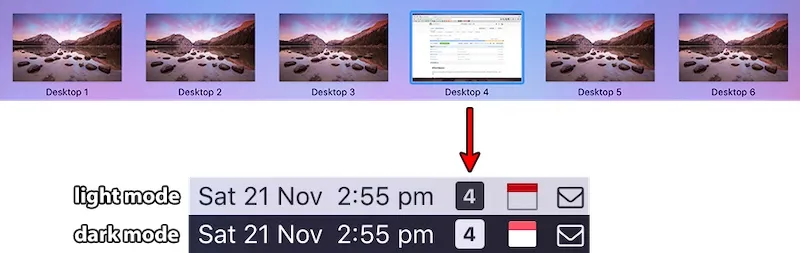
WhichSpace displays the currently active macOS Space number in the menu bar, providing persistent awareness of virtual desktop position for users who work across multiple Spaces.
The app solves a specific workflow problem: when switching between Spaces using keyboard shortcuts, macOS shows the Space number briefly but it disappears immediately. WhichSpace makes this information persistent, displaying a single number in the menu bar that updates instantly when switching Spaces.
The implementation is lightweight, consuming approximately 20-30MB of memory with negligible CPU usage. The app starts automatically on login and requires accessibility permissions to monitor Space changes, which is standard for workspace-tracking utilities.
Developer George Christou (gechr) created WhichSpace with intentional minimalism. The entire app is open source under the MIT license, with code publicly available on GitHub. Users can review exactly what the app does before installation, which matters for any utility requiring system-level permissions.
Installation involves downloading the release from GitHub, moving it to the Applications folder, and granting accessibility permissions when prompted. No installer or background services are required.
Requirements include macOS 10.11 El Capitan or later, covering a wide range of Mac configurations.
Limitations: The app does not offer appearance customization. The number displays in whatever style matches the menu bar theme. Color coding or custom icons for different Spaces are not available. This is a deliberate design choice favoring simplicity over configurability.
Alternatives include Mission Control for visual Space overview, though it requires an extra step that interrupts workflow. macOS natively shows Space numbers briefly when switching but does not provide persistent display.
Suitable for users who manage multiple virtual desktops throughout the day and want continuous awareness of their current Space position without interrupting workflow.


