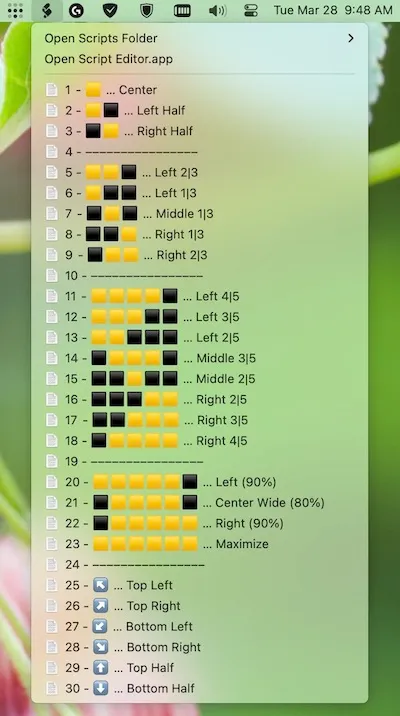
Squares provides window positioning and resizing through AppleScripts rather than a standalone application. The tool leverages macOS’s built-in Script Editor to deliver window management via the menu bar, requiring no accessibility permissions or third-party installations.
Installation involves enabling Script Editor’s menu bar functionality in preferences and copying .scpt files into the User Scripts folder. Once configured, scripts appear in the menu bar under the Script Editor icon, providing access to snap windows to halves, quarters, and full screen positions.
Key features include left half, right half, top half, bottom half, and quarter positioning options. The entire codebase consists of approximately 100 lines of readable AppleScript under the MIT license, allowing users to audit, modify, or extend the scripts for custom positioning requirements.
Keyboard shortcuts can be assigned through Automator or the Shortcuts app, though both methods introduce slight execution delays. The developer acknowledges this limitation in the documentation. Menu bar access typically proves more practical than keyboard shortcuts due to these delays.
Requirements are minimal: any Mac running a modern macOS version with Script Editor. Performance impact is essentially zero since scripts run on demand rather than as background processes.
Limitations include basic functionality compared to commercial alternatives. No window history, multiple monitor support with per-display zones, or zero-delay keyboard shortcuts. The interface is functional rather than polished.
Alternative window management tools include Rectangle, Magnet, and BetterSnapTool, which offer more features but require installation and accessibility permissions.
Suitable for users who face installation restrictions in corporate environments, have privacy concerns about accessibility permissions, or prefer transparent open-source solutions they can fully audit and modify.


