
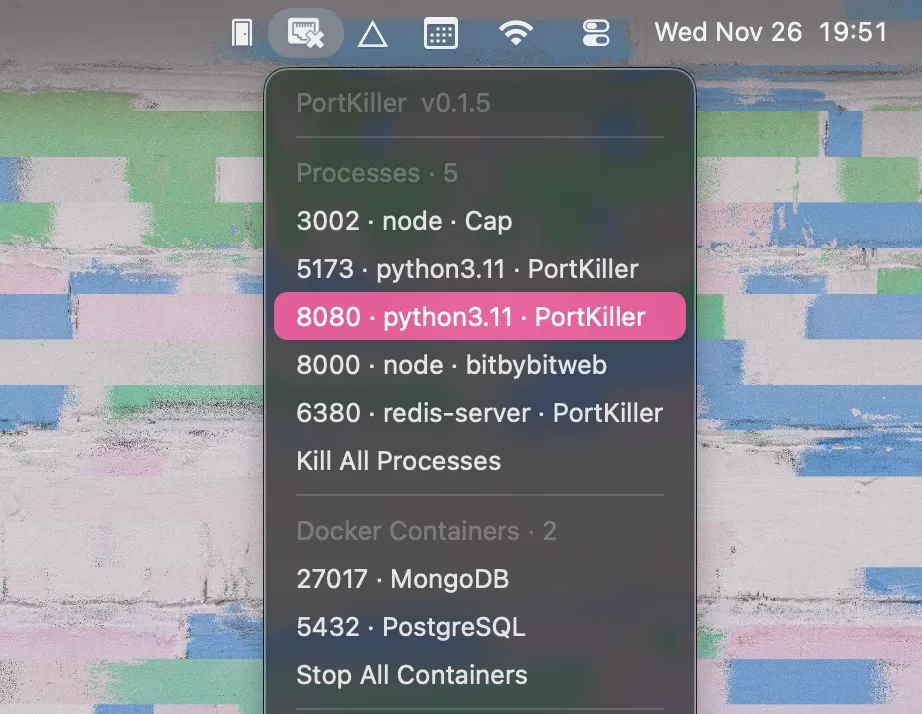
PortKiller eliminates the manual terminal workflow of finding and killing processes occupying development ports. Instead of running lsof and kill commands, users click the menu bar icon and terminate port-blocking processes directly.
The app monitors common development ports and displays active processes grouped into three categories: regular processes, Docker containers, and Homebrew services like PostgreSQL or Redis. Each entry shows the occupied port and, when possible, identifies the associated Git project, helping developers determine which forgotten server needs termination.
Process termination follows proper signal handling: SIGTERM is sent first to allow graceful shutdown, escalating to SIGKILL only if necessary. Desktop notifications alert users when new processes begin listening on monitored ports.
Pre-configured port monitoring covers Node.js, React, Vite, Django, Flask, and MongoDB defaults. Custom port monitoring is available through JSON configuration. The Rust implementation ensures minimal resource footprint with negligible performance impact. Both dark and light modes are supported.
Docker container detection integrates natively, identifying and managing containerized processes alongside native applications without requiring Docker Desktop interaction.
Installation requires downloading the DMG from GitHub releases and granting network monitoring permissions. System requirements include macOS 10.15 Catalina or later with Intel and Apple Silicon support. Current version is 0.1.5.
The app is free and open source under MIT license, maintained by developer gupsammy. As a single-developer project, update frequency and support responsiveness may vary.
Limitations include the narrow focus on development workflows, meaning non-developers running local servers will find limited utility. Network monitoring permissions are required, though the open-source code enables verification of app behavior.
Suitable for users who regularly work with local development servers, frequently switch between projects using the same ports, or manage Docker containers for local development.


