
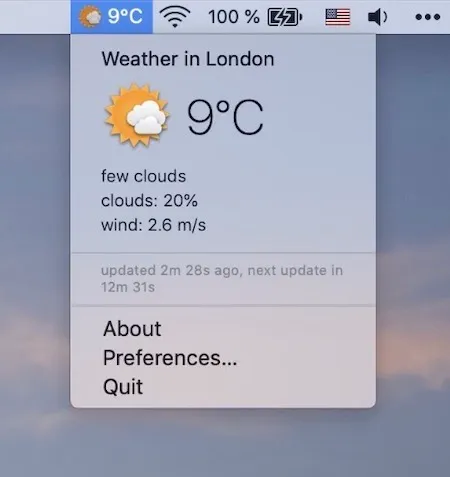
I check the weather constantly throughout the day, usually by pulling out my phone or opening a browser tab. It’s one of those small inefficiencies that adds up over time. Working from my home office, I coordinate with colleagues across multiple time zones, and knowing whether to expect rain during my afternoon walk or clear skies for the evening has become part of my daily routine.
Weather for Status Bar addresses this need with a stripped-down approach. The app places current weather information directly in your menu bar where you can see it at a glance. No elaborate widgets, no promotional content, no notifications asking you to upgrade. Just the weather, updated automatically every fifteen minutes.
Developer Mykola Blokhin has built something refreshingly focused. The app shows the current temperature and conditions in your status bar. Click the icon and you get a popup with more detailed information. That’s the entire feature set, and sometimes that’s exactly what you need.
I’ve been running Weather for Status Bar on my Mac Mini M4 for the past couple of weeks, and it does exactly what the name suggests. The app requires macOS 10.14 Mojave or newer, which covers virtually any Mac still in active use. At 52.4 MB, it’s not the smallest weather app available, but it’s hardly a burden on modern storage.
The automatic fifteen-minute updates strike a reasonable balance between staying current and not hammering weather services with unnecessary requests. For most users, this refresh rate provides adequately current information without being overkill. The app pulls data without requiring you to configure API keys or create accounts with weather services.
What makes this app notable is less about what it does and more about what it doesn’t do. There are no ads cluttering the interface. No subscription prompts. No requests to rate the app or share it with friends. It’s completely free, available through the Mac App Store, and simply provides weather information where you can see it without hunting through apps or browser bookmarks.
The limitations are worth noting. Some users have reported occasional data accuracy issues when comparing readings to other weather services. This isn’t uncommon across weather apps, as different services use different data sources and modeling. If you need precise forecasts or specialized meteorological data, you’ll want something more robust. Weather for Status Bar is built for quick reference, not detailed planning.
The app hasn’t received updates since November 2019, with version 1.3 being the current release. The developer fixed icon display issues and removed the default city requirement on first install in that final update. While the lack of recent updates might concern some users, the app continues to function on current macOS versions including Sequoia. For a simple utility like this, stability matters more than constant feature additions.
Users with crowded menu bars will need to consider whether the space trade-off makes sense for their workflow. The app adds another icon to an area that gets congested quickly on modern Macs. If you already run menu bar managers to organize your icons, adding a weather display is straightforward. If your menu bar is already overflowing, this might push you to finally install something like Ice or Bartender to manage the clutter.
The App Store reviews show a generally positive response, though without enough ratings to generate an overall score. Users who want uncomplicated weather information appreciate the straightforward approach. Those looking for features like detailed forecasts, weather alerts, or customization options will be disappointed.
For users who simply want current weather conditions visible in their menu bar without complexity, Weather for Status Bar delivers. It won’t replace a full-featured weather app for travel planning or outdoor activities, but for quick reference throughout the workday, it removes the friction of checking weather by making the information always visible. In a category often cluttered with features you’ll never use, this app’s simplicity is its strength.