TrillMark assigns custom notification sounds and colored visual alerts to individual apps on macOS, enabling users to identify the notifying application by sound or flash alone without looking at their screen. ($7.99 launch price, one-time)
Each app in the notification permission list can be assigned its own sound from built-in macOS tones, 24 included clips, or user-imported audio files. Alongside audio cues, TrillMark can display a full-screen color wash or a screen-edge band in a configurable color whenever that app sends a notification. The per-app label can be shown in the flash, identifying the source at a glance.
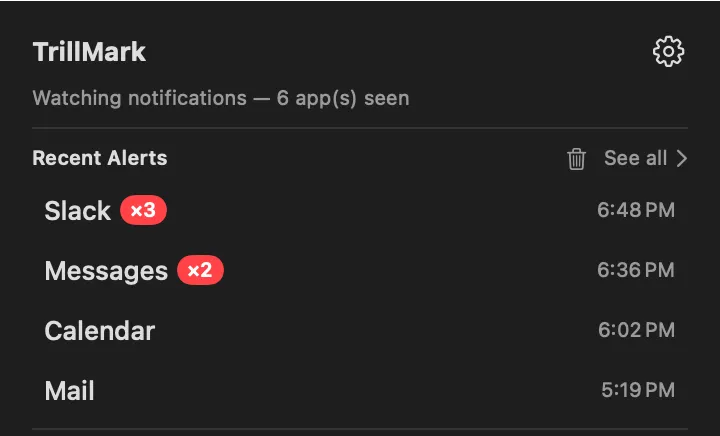
A menu bar dashboard logs recent notification alerts, providing a quick history review without opening Notification Center. Rules-based filtering lets users set conditions on notification title or body content, triggering different sounds or visuals only for specific keywords—for example, a louder tone when a Slack message contains an @mention.
The app includes an audio clip editor for trimming imported sounds and an interface for assigning flash configurations per app. Two simultaneous alerts from different apps display in their respective colors without collision. TrillMark is designed with accessibility in mind, allowing flash alerts to substitute entirely for audio.
System requirements: Apple Silicon Mac, macOS 26 (Tahoe) or later. Distributed directly from https://trillmark.app (not on the Mac App Store). Developer ID–signed and Apple-notarized. No analytics or data collection.
Pricing: ($7.99 launch price; regular $14.99, one-time). License covers up to 3 Macs. 14-day money-back guarantee.
Limitations: Requires macOS 26 and Apple Silicon, excluding Intel Macs and systems on macOS 15 Sequoia or earlier. Sound customization requires importing audio files manually; there is no built-in library beyond the 24 included tones.
Alternatives: The built-in macOS Notification Center provides differentiated notification banners but no custom sounds. Focus Filter (macOS built-in) suppresses notifications by context but does not customize alert sounds. Navi (menu bar notification manager) offers notification reminders without per-app audio customization.
Suitable for users who work with multiple chat apps and monitoring tools simultaneously and want immediate audio or visual identification of which app is requesting attention.


