Calendar 366 app icon

Calendar 366

nspektor.com

A comprehensive menu bar calendar with natural language event creation, multi-calendar support, and powerful widgets for macOS

I manage a remote team spread across multiple time zones, which means I’m constantly juggling events across different calendar systems. After trying several menu bar calendar apps, I discovered Calendar 366 II while searching for something that could handle complex scheduling scenarios without forcing me to open Calendar.app dozens of times daily.

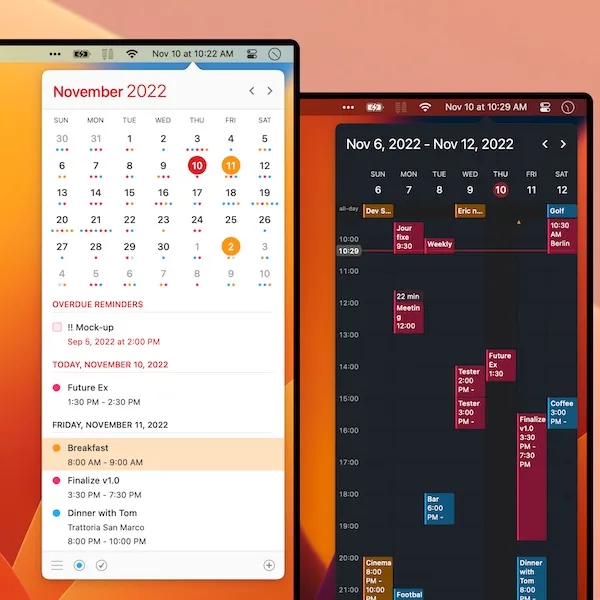
Calendar 366 II transforms your menu bar into a complete calendar management system. The app replaces your standard system clock with a customizable date display that reveals a full-featured calendar interface with a single click. What immediately impressed me was the natural language event creation - you can type “lunch with Sarah tomorrow at 1pm” and the app correctly interprets the date, time, and creates the event. This approach feels significantly faster than filling out traditional event forms.

The app supports eight different calendar views and nine visual themes, allowing you to customize how your schedule appears. During my time with the app on my M2 MacBook Air running macOS 15.4, I found the month view most useful for quick overview, but the week and agenda views proved valuable when planning detailed schedules. Each view adapts intelligently to show relevant information without overwhelming you with unnecessary details.

Multi-calendar support is where Calendar 366 II really shines. The app seamlessly integrates with iCloud, Google Calendar, Exchange, Outlook, and any CalDAV service you’re already using. Calendar sets let you organize and view different calendar groups simultaneously - I maintain separate sets for work meetings, personal appointments, and team schedules across different time zones. This organizational flexibility eliminates the constant toggling between different calendar sources.

For macOS Sonoma users, Calendar 366 II includes ten widgets that integrate with the notification center and desktop. These widgets provide quick access to upcoming events and allow rapid task creation without opening the full app. The widgets respect your calendar sets, so you can configure separate widgets showing different calendar groups simultaneously.

The attendee management system supports sending invitations and attaching files to events, with everything syncing via iCloud. This integration means meeting invitations sent through Calendar 366 II appear correctly in recipients’ native calendar applications. I’ve been using this feature for scheduling video calls with my international team, and the synchronization has been reliable across different platforms and time zones.

One unique feature is the Spotlight integration using the “C366” keyword. Type “C366 next meeting” in Spotlight, and the app displays your upcoming appointment details without switching applications. The Touch Bar support on compatible MacBook Pro models adds another layer of quick access for navigation and event creation.

Advanced users can extend functionality through Alfred and LaunchBar integrations. These workflows enable triggering specific calendar actions through your preferred launcher, which fits naturally into power user workflows. The app also includes support for complex repeating rules - you can create events that repeat on specific days, with exceptions, or follow custom patterns that standard calendar apps often struggle with.

Performance impact is minimal. The app uses roughly 80MB of memory and around 1% CPU during normal operation, even when displaying multiple calendar sources and running background synchronization. Calendar 366 II requires macOS 10.14.6 Mojave or newer and runs natively on Apple Silicon through macOS 15 Sequoia.

The developer offers a 30-day trial from their direct store, with the full version available for purchase through both the n.spektor Store and Mac App Store. Current version 2.15.7 includes recent improvements to the widget system and natural language processing. The app also extends across the Apple ecosystem with companion versions for iPhone, Apple Watch, and iPad that maintain feature parity and synchronization.

The extensive feature set requires time investment to configure properly. The multiple views, themes, and calendar sets offer powerful customization but can overwhelm users who simply want basic calendar access. The natural language parser occasionally misinterprets complex scheduling phrases, requiring manual correction. Users with crowded menu bars might need to reorganize their layout to accommodate Calendar 366 II’s customizable menu bar display.

Calendar 366 II represents a significant upgrade over simpler menu bar calendars for users managing complex scheduling across multiple calendar sources and time zones. The natural language input, comprehensive view options, and deep system integration make it particularly valuable for remote workers, international teams, or anyone who treats their calendar as a primary productivity tool rather than a simple date reference.

Related Apps