
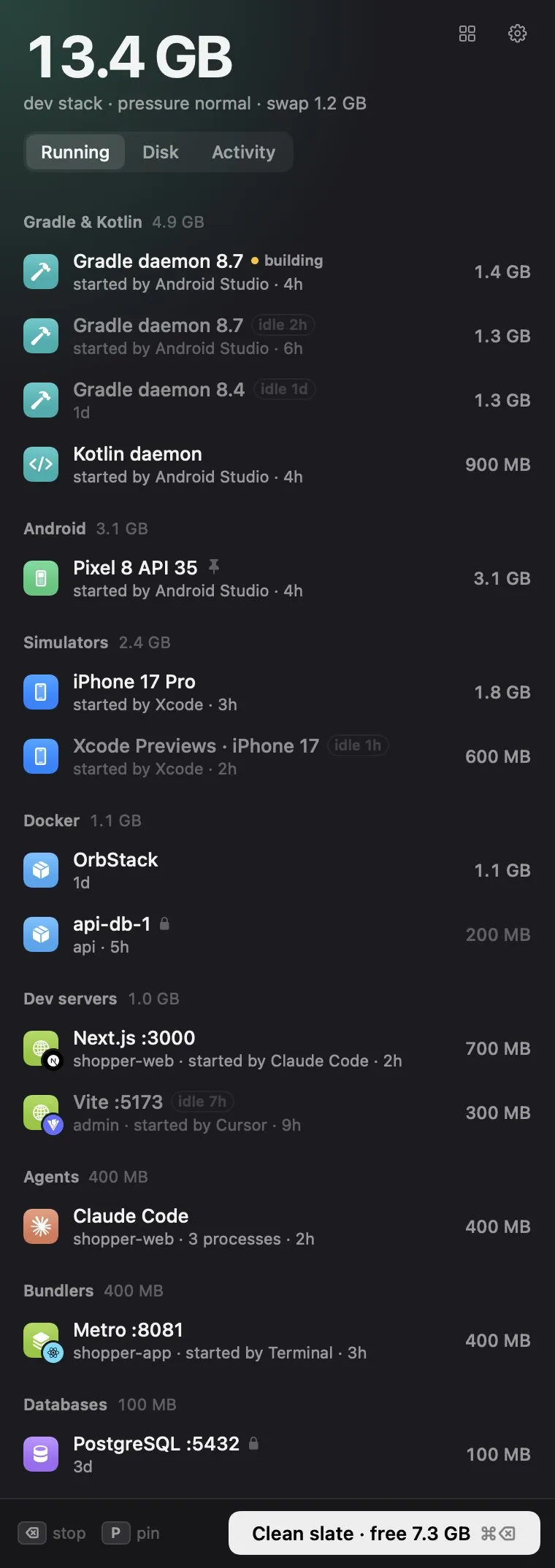
Ramback is a menu bar utility that discovers and stops idle developer tools consuming memory on macOS. (Free; Pro $19, one-time) It targets iOS simulators, Android emulators, Gradle daemons, Docker containers, dev servers, and lingering AI agent processes, and stops them using each tool’s own shutdown method rather than force-quitting.
The main panel lists running dev processes with their RAM consumption, the tool that spawned them, and how long they have been idle. Individual processes can be stopped, pinned to protect them from automatic stopping, or released from pin. The Clean Slate action stops all unprotected idle processes in one click. Active builds, databases, and pinned processes are excluded from all operations. Ramback uses xcrun simctl shutdown for iOS simulators, adb emu kill for Android emulators, and docker stop for containers; dev servers receive a graceful termination signal first.
The free tier includes manual process control, dev server and AI agent automation rules, disk space scanning (which identifies reclaimable space from Xcode and Android Studio caches), and a CLI and MCP server for use from a terminal or AI agents. The Pro tier ($19 one-time) adds simulator, emulator, and daemon automation rules; memory-pressure warnings; Undo for rule-based stops; disk cleanup (not just scan); and an activity log. A 14-day Pro trial is included with every download. Team licences are available for $69 covering 10 Macs. No account is required for the free tier.
System requirements: macOS 14 Sonoma or later. Universal binary (Apple Silicon and Intel). Download size approximately 4.5 MB. No Full Disk Access or Accessibility permission required.
Pricing: (Free) core features. (Pro $19, one-time) for automation rules, memory warnings, disk cleanup, and Undo. (Team $69) for 10 Macs. 14-day Pro trial included. 30-day refund policy.
Limitations: macOS 14 minimum excludes users on Ventura and earlier. Pro features including simulator and emulator rules require the paid licence after the trial. Disk cleanup (not just scanning) requires Pro. The app is made by a single independent developer.
Alternatives: Memory Cleaner Pro ($1.99/month) provides general RAM reclamation without developer tool awareness. Activity Monitor (built-in) shows all processes but requires manual identification and termination. Sloth (free, open-source) lists open files and ports by process but does not stop them automatically.
Suitable for developers who run iOS simulators, Android emulators, or Docker containers regularly and lose available memory to idle background processes between active use sessions.


