
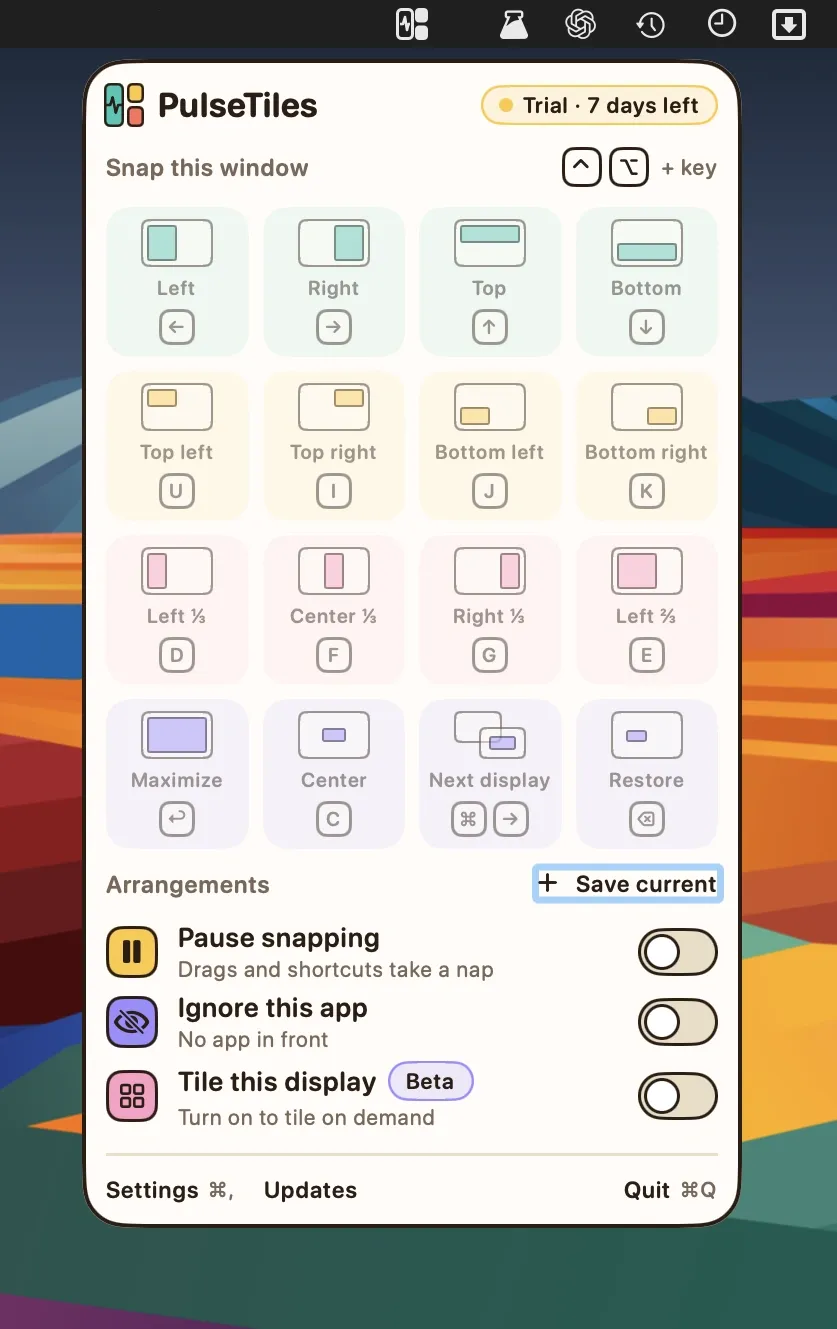
PulseTiles is a window-snapping utility that positions windows into defined zones using ⌘-drag, keyboard shortcuts, or a quick launcher. ($4.99, one-time) It is distributed as a direct download with no App Store listing.
Three input methods are available for snapping: hold ⌘ and drag a window onto one of 11 visible zones with a live placement preview; press a ⌃⌥ keyboard shortcut; or open the right ⌘ + / launcher and choose a position by keyboard. All three methods share the same 19 snap actions: halves, quarters, thirds, two-thirds, maximize, almost-maximize, center, restore, and next or previous display. Pressing the same shortcut again cycles through half, third, and two-thirds sizes, which is togglable in settings.
The Arrangements feature saves a named set of window positions and restores them via the menu bar icon or a keyboard shortcut. This covers common multi-app layouts such as a browser beside a terminal or an editor with a reference window. Custom keyboard shortcuts can be recorded for any action with conflict detection, and rules can exclude specific apps from snapping. Small windows such as dialogs are automatically skipped. Gaps between windows, screen-edge padding, and almost-maximize margins are adjustable. A beta tile-all option (⌃⌥⌘T) places the focused window on the left and stacks remaining windows on the right.
Multi-display support is built in: snapping works on every connected display and shortcuts move windows between displays. When a snapped window is dragged out of its zone, PulseTiles restores it to its pre-snap size automatically.
System requirements: macOS 14 Sonoma or later. Accessibility permission required. Available for Apple Silicon and Intel Macs. Network access only for licence activation and update checks.
Pricing: ($4.99, one-time) with a 7-day free trial and a 30-day refund policy via Lemon Squeezy. No subscription.
Limitations: No App Store listing; licence activation requires an internet connection. The tile-all mode is beta and may behave unexpectedly. Accessibility permission grants the app broad system access for window control.
Alternatives: Magnet ($7.99, App Store) offers similar snap zones with a longer track record. Rectangle (free, open-source) provides comparable snapping without cost. Moom ($9.99) adds per-app saved layouts and more customization depth.
Suitable for users who frequently resize and rearrange windows across multiple displays and want keyboard-driven snap actions beyond what macOS Stage Manager provides.


