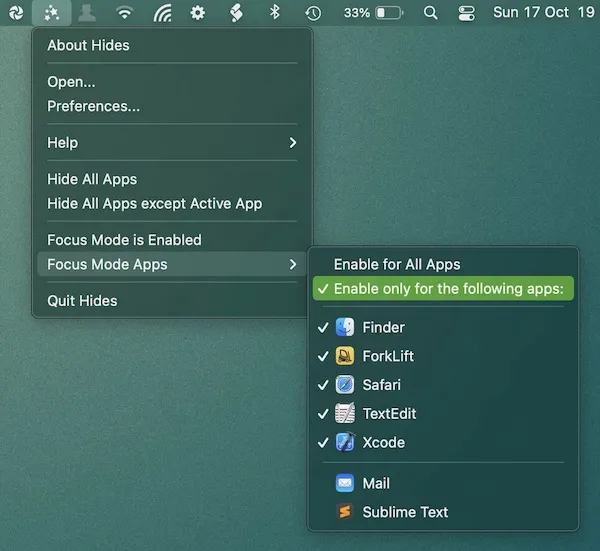
Hides creates a distraction-free workspace by automatically hiding non-active applications when switching between them. The app provides three primary modes: hide all apps via menu bar click, hide all except the current app, and Focus Mode that maintains a clean desktop by continuously hiding background applications. ($4.99, one-time)
The Focus Mode feature can be configured globally or on a per-application basis. Users can specify which apps trigger automatic hiding, allowing for customized distraction management workflows. For example, Focus Mode might activate when launching a writing app but remain disabled for general browsing.
Keyboard shortcut support enables quick access to all main features without reopening the menu bar interface. The shortcuts are customizable and provide rapid toggling between modes. The app runs continuously in the background, detecting app switching events and applying hide rules automatically.
Resource usage is minimal, with the app designed as a lightweight utility that integrates into the menu bar without significant performance impact. The interface supports localization in English, Dutch, German, Traditional Chinese, and Simplified Chinese.
System requirements: macOS 14 (Sonoma) or later. Available as direct download (DMG) or through the Mac App Store.
Pricing: $4.99 one-time purchase with a free 2-week trial available via direct download.
Limitations: Requires macOS 14 or newer, excluding users on older systems. Focus Mode behavior may need adjustment when working with apps that spawn multiple windows or require frequent background app interaction. The automatic hiding can occasionally interfere with workflows requiring quick reference to multiple visible apps.
Alternatives: Users seeking more comprehensive window management may consider Rectangle or Magnet. For simpler app hiding without automatic triggers, macOS built-in Command+H provides manual hide functionality.
Suitable for users who struggle with desktop distractions and need enforced focus during concentrated work sessions, particularly writers, developers, and knowledge workers who benefit from single-app isolation.