
Simple Hiding
Hidden Bar
Hiding and revealing icons with a single divider.
The Catch There are no context-aware presets or automation.
The notch ate 23 menu bar icons. How Ice, Hidden Bar, Bartender, and Thaw actually hide, search, and restore them — and which one I kept.
Simple Hiding
Hiding and revealing icons with a single divider.
The Catch There are no context-aware presets or automation.
Open-Source Control
Searching and customizing menu bar items with an Ice fork.
The Catch Stable and beta releases have different macOS requirements.
Automated Layouts
Changing menu bar layouts with contextual presets.
The Catch It is paid software and requires Accessibility access.
| App | Best For | Price | The Catch |
|---|---|---|---|
| Hidden Bar | Hiding and revealing icons with a single divider. | Free | There are no context-aware presets or automation. |
| Thaw | Searching and customizing menu bar items with an Ice fork. | Free | Stable and beta releases have different macOS requirements. |
| Bartender | Changing menu bar layouts with contextual presets. | Paid | It is paid software and requires Accessibility access. |
My menu bar hit maximum density when I installed the 23rd utility. Icons ran from the notch to the clock. A notification badge I needed sat behind the camera housing. Mid-call I spent half a minute hunting for the audio icon while everyone waited.
I did not need another “best menu bar managers” list. I needed the icons I use to stay visible, and a way to get the rest back without clicking through a junk drawer.
Hidden Bar (Free, open-source) added a chevron. Drag icons to the right of it, they hide. Click the chevron when you need them. Auto-hide after a delay is optional.
I ran it on a Mac Mini for two months and stopped thinking about it. Homebrew install (brew install --cask hiddenbar), negligible CPU, source on GitHub. No search, no presets, no appearance controls. If you have eight extra icons and a notch, this is the whole fix.
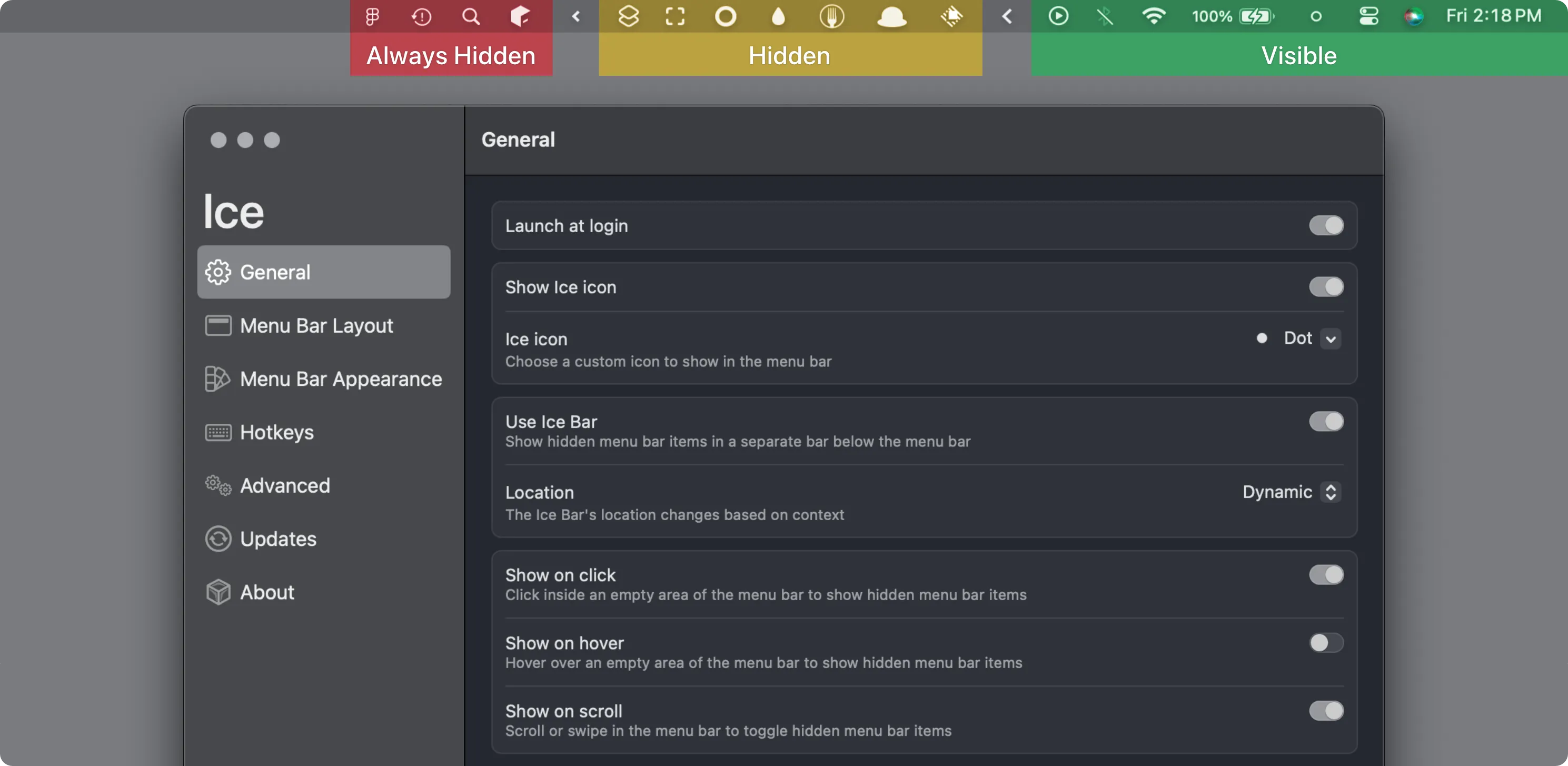
Ice (Free, open-source) is what I kept on the laptop. Visible, hidden, and always-hidden sections. A hotkey opens search across every item, including the ones you buried on purpose.
After six weeks on a MacBook Pro, I stopped visually scanning the bar. During focus I collapse everything except a timer. During coding I pull developer tools back with the keyboard. It needs macOS 14+ and screen recording permission for the advanced bits. Users who only want a chevron will find the three-tier model fussy. Users with 20+ utilities will not.
Install with brew install --cask jordanbaird-ice. GPL-3.0.
Thaw is an Ice fork aimed at macOS 26. Same job — hide, search, rearrange — if you are already on that OS and Ice’s release cadence is not.
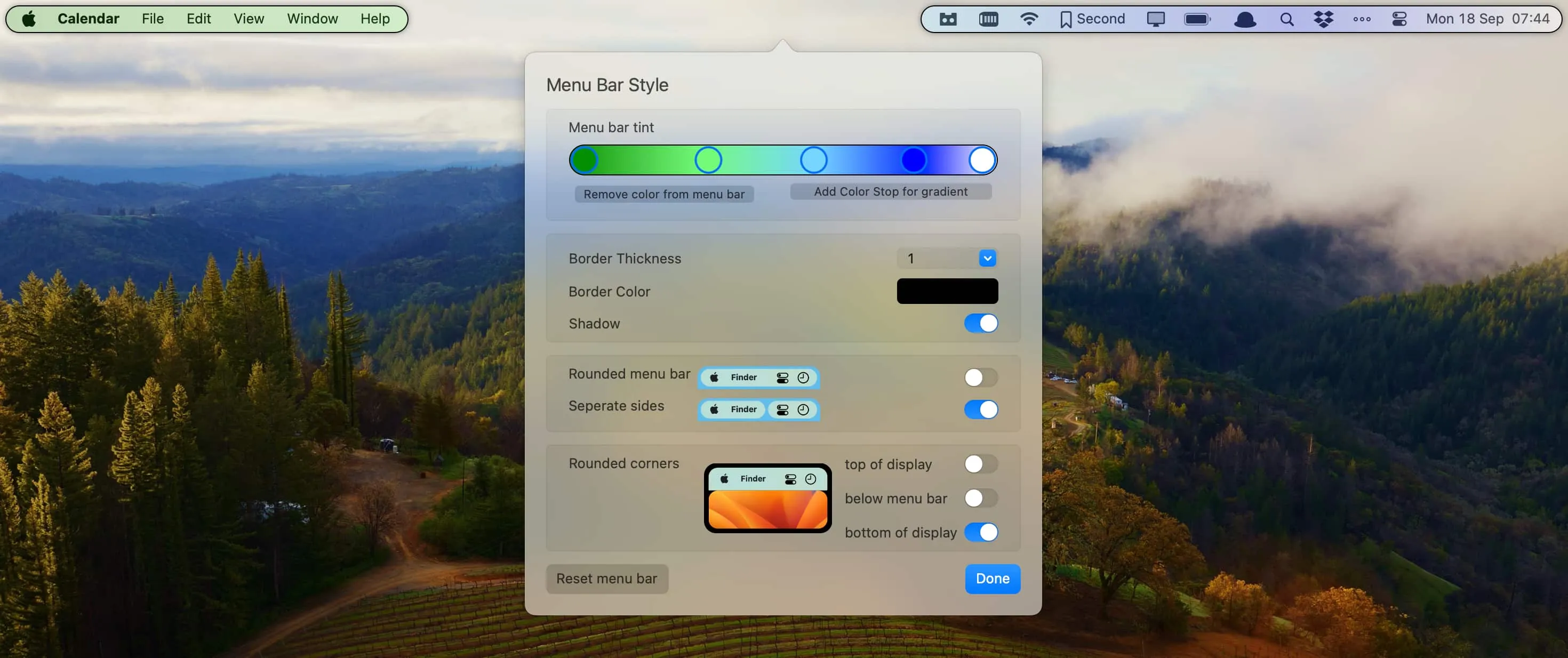
Bartender ($16 one-time) has been the paid standard for a decade. Bartender 5 adds presets tied to battery, Wi-Fi, time, and a second row under the main bar. Hover, scroll, or swipe to reveal. AppleScript if you automate elsewhere.
I gave it a three-week trial and went back to Ice. Not because Bartender is worse — I did not use the presets or the visual chrome. If you want that automation, the 4-week trial is long enough to find out. Sonoma minimum; Bartender 4 still exists for older Macs.
The win is not a prettier menu bar. It is not hunting for an icon while someone waits on a call.
Selection notes summarize the linked app entries. Prices, compatibility and release status can change. Open the full review and confirm requirements with the developer before installing.