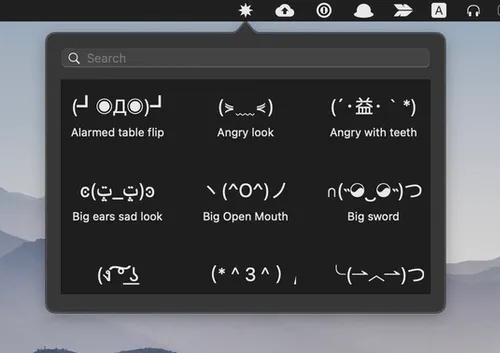
FlipTable is a menu bar utility that provides instant access to over 200 text emoticons, including the classic table flip (╯°□°)╯︵ ┻━┻ and various kaomoji expressions. The app enables quick insertion of text-based emoticons into any application without disrupting workflow.
Users activate the app with Command+Option+K, which displays a searchable list of emoticons organized by emotion tags such as happy, angry, sad, and varying intensities of table-flipping. Arrow key navigation and Enter key selection copy the chosen emoticon to the clipboard for immediate pasting. The collection includes shrugging figures, happy faces, and dozens of other ASCII art expressions beyond the signature flip table variants.
The app focuses on a single task: providing organized, searchable access to text emoticons. Each selection automatically copies to the clipboard and returns users to their previous application. The emotion tagging system categorizes emoticons for quick browsing when users want to explore options rather than search directly.
System Requirements
- macOS (specific version not documented; works on modern macOS releases)
- Direct download from developer’s Google Drive
- Requires Gatekeeper bypass (right-click, select “Open”) on first launch
Limitations
- Not notarized by Apple; requires manual security override on first launch
- Early development stage (v0.1.1, released May 2021)
- No App Store distribution; updates require manual download
- Limited documentation on system requirements
Alternatives
- TextExpander or Espanso for custom emoticon shortcuts (requires manual setup)
- Maccy or CopyClip clipboard managers for storing frequently used emoticons
- Rocket (emoji picker) for standard emoji with some kaomoji support
- Built-in Character Viewer (Control+Command+Space) for limited emoticon access
(Free)
Suitable for users who frequently use text-based emoticons in chat applications like Slack, Discord, or Messages, particularly those familiar with kaomoji culture and comfortable with non-App Store software installation.


