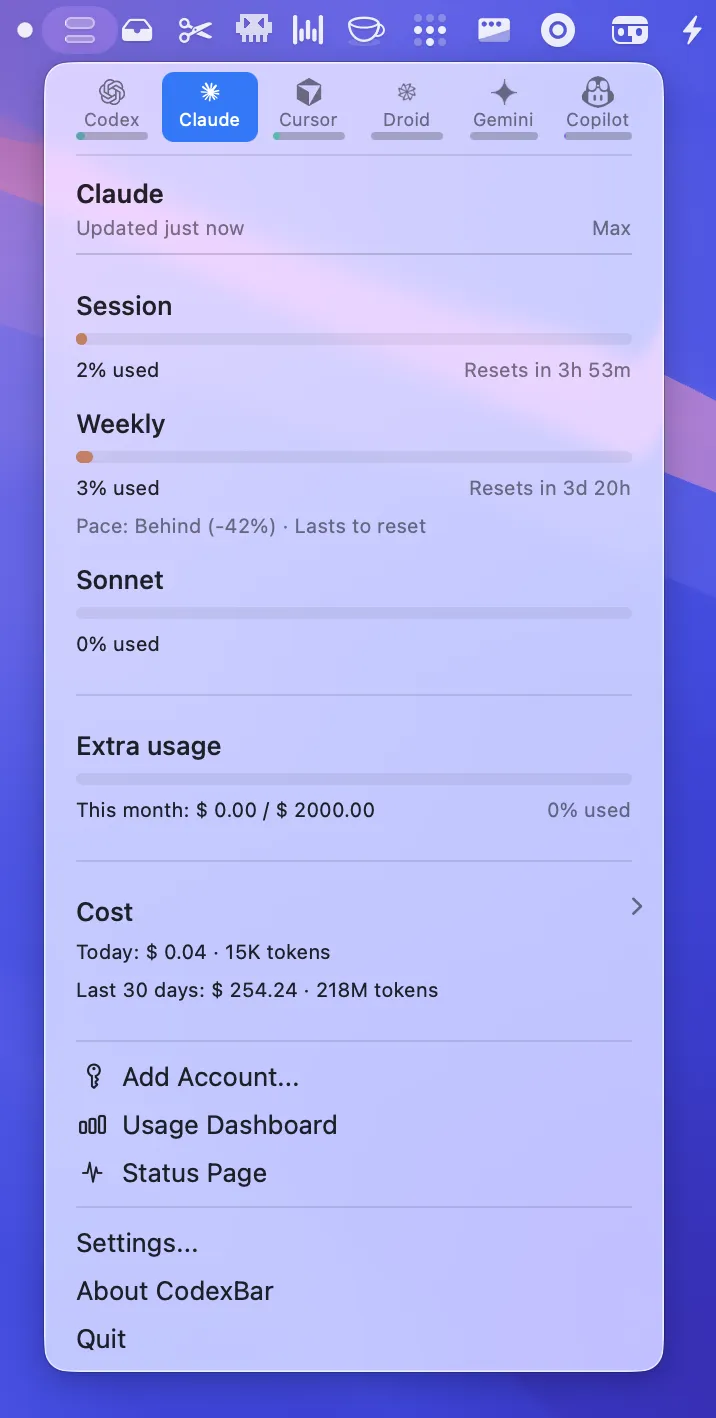
CodexBar provides real-time tracking of API usage limits and session quotas for AI coding assistants directly in the menu bar. The app monitors eight platforms: Codex, Claude Code, Cursor, Gemini, Antigravity, Droid, Copilot, and z.ai.
Usage information displays in a dual-meter format with session usage on top and weekly limits on the bottom. A countdown timer shows exactly when limits reset, enabling developers to plan work across multiple AI tools based on available quota.
The app retrieves usage data by reusing existing browser cookies from Safari, Chrome, or Firefox. No passwords are stored locally. This approach requires browser authentication but avoids credential management within the app itself.
Additional features include a bundled CLI tool for scripts and CI workflows, WidgetKit support for desktop widgets mirroring the menu bar display, and provider status incident tracking.
Built by Peter Steinberger and released as free and open-source software under the MIT license.
System requirements: macOS 14 or later. Supports both Apple Silicon and Intel Macs.
Installation: Download from GitHub releases or install via Homebrew with brew install --cask steipete/tap/codexbar.
Pricing: Free, open-source (MIT license).
Limitations: The dual-meter display requires moderate menu bar space. Cookie-based authentication depends on maintaining active browser sessions with each AI service. Tracking accuracy relies on service dashboards exposing usage data.
Alternatives: Manual dashboard checking for individual services. Some AI coding tools include built-in usage displays, though none aggregate across multiple platforms.
Suitable for users who work with multiple AI coding assistants and need visibility into quota consumption across services to avoid mid-session interruptions.


