
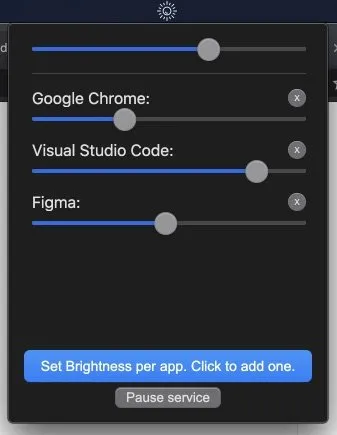
Auto Brightness provides app-specific screen brightness control through a menu bar interface. The application monitors active windows and automatically adjusts display brightness when switching between configured apps, eliminating the need to manually change brightness settings throughout the day.
The core functionality centers on per-app brightness profiles. Users configure specific brightness levels for individual applications through the menu bar interface. When a configured app becomes the active window, Auto Brightness detects the change and adjusts screen brightness to the preset value. This proves useful for users who switch between brightness-sensitive tasks—reading documents in full-screen mode versus photo editing applications that require accurate display calibration.
The configuration process is straightforward. Users select applications from their system, assign brightness percentages (0-100%), and save profiles. The app runs continuously in the menu bar, monitoring window focus changes and triggering brightness adjustments as needed. Settings persist between restarts, requiring no reconfiguration.
System requirements: macOS only. Available as a free download from the GitHub releases page.
Pricing: Free and open-source. The project is hosted on GitHub with full source code available under an open license.
Limitations: Limited to macOS with no Windows or Linux versions available. The app requires Accessibility permissions to monitor active windows. Brightness changes may conflict with automatic brightness sensors on MacBooks, potentially requiring users to disable native auto-brightness in System Settings. The project appears to have limited recent development activity with only 9 total commits.
Alternatives: BetterDisplay (paid, broader display management features), Lunar (subscription-based with app-specific brightness), macOS native auto-brightness (ambient light-based only).
Suitable for users who need different brightness levels for specific applications and prefer automated switching over manual adjustment. Best for workflows involving frequent transitions between dark-mode coding environments and bright content creation apps.


