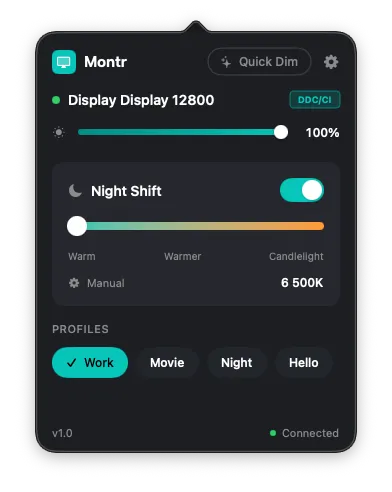
Montr provides unified control over brightness, contrast, and color temperature across multiple monitors through a menu bar interface. The app uses DDC/CI protocol for hardware-level display adjustments rather than software-based gamma corrections. (Free, open-source)
The per-display control system enables independent adjustment of brightness (0-100%), contrast, and color temperature (2700K-6500K) for each connected monitor. Users can create and save display profiles for different scenarios such as work, movies, or late-night use. Profiles activate automatically based on connected displays, time of day, or power source changes.
Night Shift functionality supports automatic color temperature adjustment with scheduling options for sunrise and sunset times. The app includes global keyboard shortcuts for quick brightness and profile switching without accessing the menu bar interface.
Compatibility extends to built-in displays on MacBook and iMac models, plus external monitors from Dell, LG, Samsung, ASUS, BenQ, and other DDC/CI-compatible manufacturers. Connections via HDMI, DisplayPort, Thunderbolt, and USB-C are supported.
The app runs as a Universal binary supporting both Apple Silicon and Intel Macs. All settings are stored locally with no cloud syncing, analytics, or telemetry. The developer accepts optional donations but requires no payment or account creation.
System requirements: macOS 14 Sonoma or later.
Limitations: DDC/CI support varies by monitor manufacturer and model. Some displays may not respond to all adjustment commands. USB-C hub compatibility can be inconsistent.
Alternatives: MonitorControl (similar open-source option), Lunar (more features, paid).
Suitable for users managing multiple external monitors who need quick access to brightness and color temperature controls without navigating display settings.


