
macbunny.co

All-in-one productivity toolkit with 15 menu bar tools including clipboard history, screen text capture, Keep Awake, QR generation, and desktop edge switching.

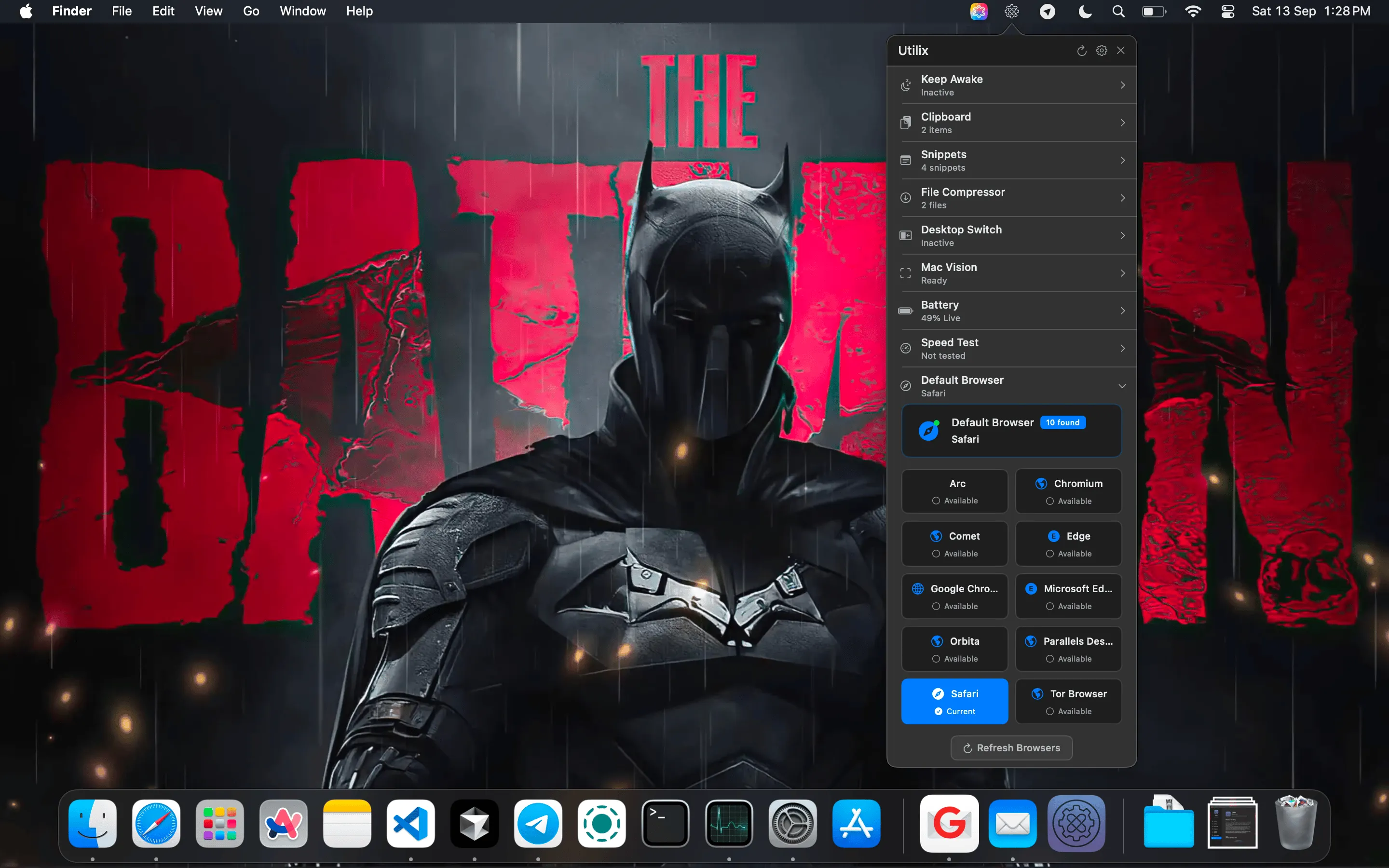
Utilix screenshot showing the app interface

I recently discovered Utilix after installing yet another single-purpose menu bar app. That’s when I realized I had seven different utilities doing things this one app handles. The question became: can a Swiss Army knife approach actually work well, or does it compromise too much?

After using Utilix for three weeks on my Mac Mini M4, the answer surprised me. This app bundles 15 different tools into one menu bar presence, and most of them work better than I expected. The interface uses a dual-click expandable design that keeps your menu bar from looking like Times Square while providing quick access to everything.

The standout feature is the screen text capture tool. It uses Apple Vision technology to extract text from anywhere on screen - locked PDFs, code in images, error messages in dialog boxes. I tested it against a scanned document with small print, and it captured everything accurately. This alone would justify keeping the app, but there’s more.

Clipboard management includes 20-item history with search functionality, plus a snippet library for frequently used text. I store email signatures, code snippets, and standard responses here. The search works fast - type a few characters and the right item appears. Nothing revolutionary, but it handles the basics efficiently.

Desktop edge switching caught me off guard. Move your mouse to the edge of the screen, and it switches to the adjacent desktop with adjustable visual feedback. Took me about two days to adapt, but now I barely use the trackpad gesture anymore. You can disable specific edges if you keep your dock visible.

The Keep Awake functionality does what Amphetamine or Caffeine does - prevents your Mac from sleeping. Add an auto-typing feature with countdown timer for those annoying forms that time out, and you’ve got practical automation tools without opening Shortcuts.

System monitoring covers battery health tracking, network status, IP detection, and speed testing. Basic stuff, but having it accessible from one menu rather than hunting through System Settings saves time. The trash monitoring feature shows your trash size at a glance - turns out I had 15GB sitting there for months.

Performance impact is minimal. Utilix uses roughly 100MB of memory and hovers around 1-2% CPU during normal operation. Sub-100ms response times according to the developer, and in my usage it feels instant. Built natively with Swift and SwiftUI specifically for macOS.

Privacy angle is solid. Everything stays local on your Mac with no tracking or telemetry. Data gets encrypted locally, which matters for clipboard history containing passwords or sensitive information. The developer publishes the code on GitHub if you want to inspect it yourself.

The app requires macOS 13 Ventura or later and runs as a Universal Binary on both Intel and Apple Silicon Macs. Current version is 1.10, updated regularly based on the GitHub activity.

Now for the limitations. Having 15 tools in one app means none of them are best-in-class. Clipboard managers like Maccy or Paste offer more sophisticated features. Screen capture specialists like CleanShot X provide more annotation options. The QR code generator works fine but won’t replace a dedicated tool if you generate codes frequently.

Menu bar space matters too. Even with the collapsible design, you’re adding another icon to an already crowded area. If you’re already running Bartender or Ice to manage menu bar clutter, this might not simplify things as much as you’d hope.

The dual-click interface takes some getting used to. Single click for quick actions, double click to expand the full menu. Occasionally I’d trigger the wrong one during the first week, though muscle memory eventually kicked in.

Current pricing sits at $10, reduced from the usual $20. A free trial is available via DMG download from the MacBunny page or through itch.io. This represents good value if you’d otherwise buy three or four separate utilities, less compelling if you prefer specialized tools.

For someone starting fresh with a new Mac, Utilix provides a solid foundation of utilities without hunting down individual apps. For power users with established workflows, it depends on whether consolidation appeals more than best-in-class tools for each function.

I’m keeping it installed primarily for the screen text capture and desktop edge switching. The clipboard manager serves as a backup to my primary tool. Everything else sits there ready when needed, which is exactly what a utility should do - stay out of the way until you need it.

Related Apps