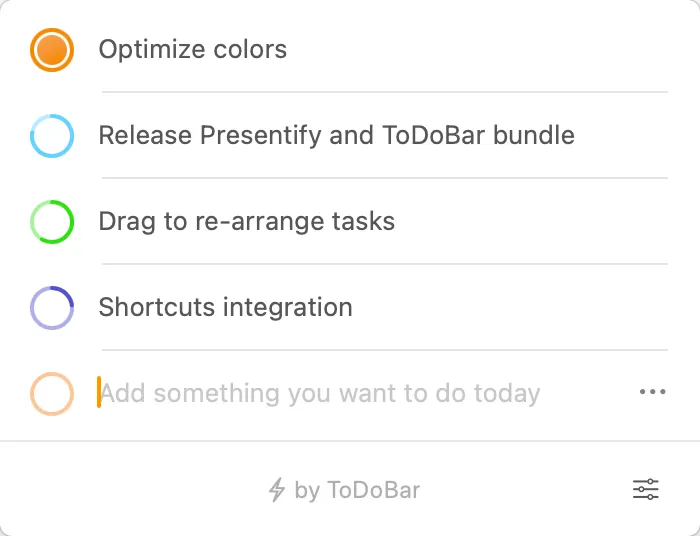
ToDoBar provides task management directly from the macOS menu bar, eliminating the friction of opening separate applications for quick task capture. Click the icon and the task list appears immediately with no windows to manage or apps to switch between. Task entry takes under five seconds: type, hit Enter, and return to the current workflow.
A distinctive feature is the visual time indicator displayed for each task. Instead of just showing due dates, the app uses a colorful ring showing both elapsed time and time remaining at a glance. Colors are customizable per task, aiding visual scanning. This approach works particularly well for tasks with approaching deadlines.
The deadline notification system offers granular control. Users set how far in advance reminders appear (one hour, one day, or custom intervals) and enable or disable notifications per task. This prevents notification fatigue from routine tasks while ensuring urgent deadlines receive alerts.
The menu bar displays pending task count directly, or can be configured to show the next pending task instead. A year-long analytics feature tracks productivity patterns with CSV export capability for analyzing completion rates or identifying workflow bottlenecks.
ToDoBar requires macOS 10.15 Catalina or later and supports both light and dark modes. The developer, Ram Patra of Softal Ltd., maintains consistent updates and offers educational discounts (50 percent off for purchases of 20 or more licenses through Apple Business Manager or Apple School Manager). Pricing is available on the Mac App Store as a one-time purchase with no subscription.
Limitations include the lack of cross-device sync, requiring separate task lists on multiple Macs. Analytics are local only with no cloud backup. Users needing team collaboration, recurring tasks, or complex project hierarchies should consider alternatives.
Alternatives include Things 3 ($49.99) for comprehensive task management, OmniFocus ($39.99) for robust project management, or the free Reminders app for basic needs without menu bar integration. Suitable for users who want persistent task visibility without dedicating screen space to another window, particularly those juggling multiple communication channels who need quick task capture without breaking focus.


