
TimeToGo
Displays real-time commute ETAs and color-coded traffic conditions in the Mac menu bar using Apple Maps data, with departure alerts and schedule control.
- Price
- Free · in-app purchases
- Requires
- macOS 14 or later
- Runs on
- Apple Silicon / Intel
- Size
- 3.9 MB
- Around Since
- 2026
- Open Source
- No
- Last Checked
- 2026-10-31
Free on the Mac App Store, with in-app purchases.
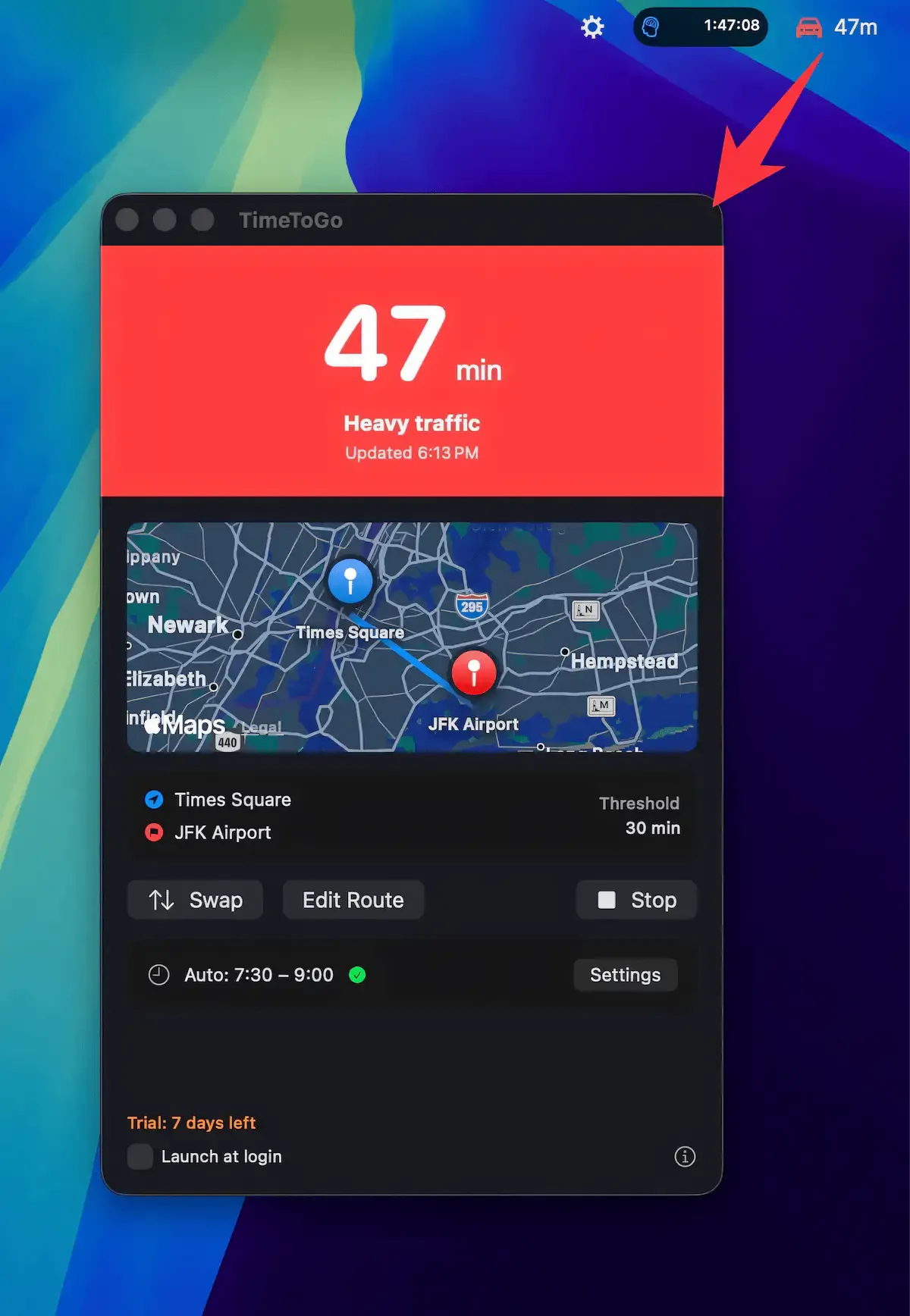
 1 screenshot
At a Glance
Best For
Watching live commute drive times before deciding when to leave.
The Catch
It covers driving routes only and relies entirely on Apple Maps traffic data.
About TimeToGo
TimeToGo displays real-time commute travel time in the Mac menu bar, drawing on Apple Maps traffic data to show color-coded road conditions and help users decide when to leave. (Free, with optional $9.99 Lifetime upgrade)
The menu bar indicator uses green, yellow, and red signals to reflect current traffic density, updating automatically every 5 minutes without requiring manual refreshes. Users configure a home and work address along with an acceptable commute time threshold; the indicator changes color when current travel time exceeds that threshold, making at-a-glance departure decisions straightforward. Origin and destination can be swapped instantly, useful for reverse commutes.
A scheduling feature allows traffic monitoring to activate only during defined time windows — for example, weekday mornings — so the app runs silently outside those periods and avoids unnecessary network queries during non-commute hours. TimeToGo requires no location permission; addresses are entered manually, keeping GPS data out of the equation entirely.
The app launches at login and operates passively with minimal resource use. Powered by Apple Maps, traffic coverage follows Apple Maps availability and accuracy, which varies by region.
System requirements: macOS 14.0 or later. App size is 3.9 MB. Available on the Mac App Store.
Pricing: (Free; Lifetime Access $9.99, Pro Yearly $7.99)
Limitations: Traffic data accuracy depends entirely on Apple Maps coverage, which is weaker than Google Maps in some regions. Available for Mac only, with no iOS companion. Limited to a single commute route per configuration; users with multiple regular routes must update settings manually.
Alternatives: Google Maps (broader traffic data, browser/mobile only); Apple Maps (free, no menu bar integration); Waze (mobile-focused, community traffic reports). No direct Mac menu bar traffic monitor offers comparable simplicity.
Suitable for users with predictable daily commutes who want a passive, privacy-respecting traffic indicator in the menu bar without opening a maps app.
FAQ
What does TimeToGo do?+
TimeToGo shows your current commute travel time directly in the Mac menu bar using real-time Apple Maps traffic data. Color-coded indicators (green, yellow, red) reflect current road conditions, and the app refreshes automatically every 5 minutes.
Is TimeToGo free?+
TimeToGo is free to download. A one-time Lifetime Access upgrade costs $9.99, and a Pro Yearly subscription is $7.99/year. Core menu bar traffic monitoring is available in the free tier.
How do I install TimeToGo on macOS?+
Download TimeToGo from the Mac App Store at https://apps.apple.com/us/app/timetogo-3-avoid-traffic/id6758940999. It requires macOS 14.0 or later and is 3.9 MB.
Does TimeToGo run on Apple Silicon?+
Yes. TimeToGo is a Mac App Store app that runs on both Apple Silicon and Intel Macs with macOS 14.0 or later.
Does TimeToGo require location permission?+
No. TimeToGo does not request location permission. Users manually enter their origin and destination addresses, so no GPS data is collected or transmitted.
How often does TimeToGo update traffic data?+
TimeToGo refreshes traffic data automatically every 5 minutes. Users can also configure monitoring to activate only during scheduled commute windows, avoiding unnecessary updates outside working hours.