
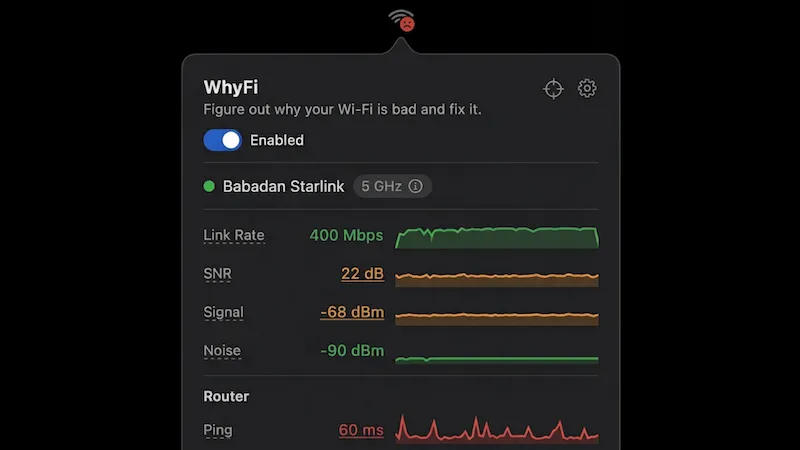
WhyFi is a macOS menu bar app that monitors Wi-Fi connectivity in real time, diagnosing whether connection problems originate from the local Wi-Fi signal, the router, or the ISP. ($10, one-time)
The menu bar display provides at-a-glance status using a traffic-light color scheme: green indicates healthy connectivity, orange signals degraded performance, and red marks a broken connection. Clicking the icon opens a panel with layered metrics—signal strength, noise floor, SNR, transmit rate, router ping, internet ping, jitter, and DNS lookup time—each mapped to a specific network segment to isolate problems accurately.
WhyFi Radar updates measurements four times per second and serves as a physical positioning guide, showing how signal quality changes as the Mac moves around a space. The channel scanner identifies congested Wi-Fi channels and recommends less crowded alternatives. For DNS troubleshooting, the app includes one-click switching between Google (8.8.8.8) and Cloudflare (1.1.1.1) resolvers. A captive portal detector recognizes hotel and airport login requirements automatically. Diagnostic reports can be exported in a format suitable for pasting into ChatGPT or Claude for AI-assisted analysis.
Speed testing uses Cloudflare’s infrastructure and includes bufferbloat detection, which surfaces latency spikes under load that degrade real-world performance even on high-bandwidth connections. Adaptive polling reduces battery impact when the Mac is idle.
System requirements: macOS 13 Ventura or later. Compatible with Apple Silicon and Intel Macs.
Pricing: ($10, one-time). 100% of proceeds are donated to Jet Set Petz, a Bali-based animal welfare charity.
Limitations: No persistent historical data logging or graphing over time. DNS switching is limited to Google and Cloudflare presets without custom resolver entry. macOS 13 minimum excludes older systems still running Monterey or earlier.
Alternatives: NetSpot (freemium, more detailed Wi-Fi survey and heatmap tools), WiFi Explorer ($19.99, advanced channel scanning and network analysis for power users), and the built-in macOS Wireless Diagnostics utility provides basic signal scanning at no cost.
Suitable for users who need quick, layer-by-layer Wi-Fi diagnostics without launching a full network utility, or for troubleshooting intermittent connectivity issues at home and in shared spaces.


