
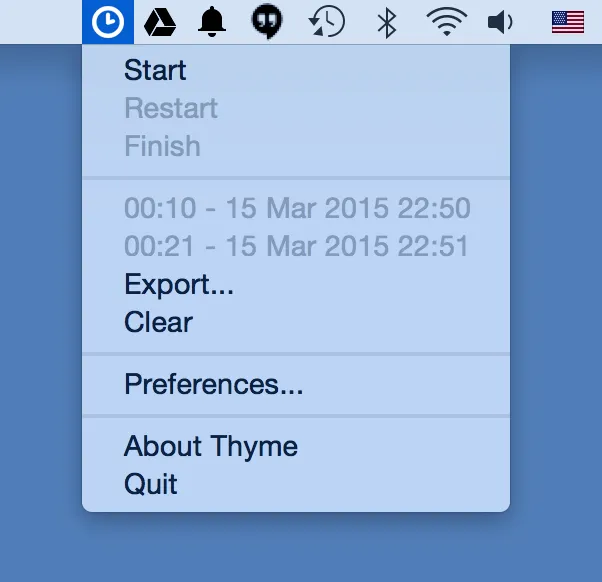
Thyme provides minimalist time tracking through the Mac menu bar, focusing on essential functionality: starting a timer, stopping it, and recording task durations. The app displays the current timer in the menu bar with quick access to basic controls.
When starting a timer, Thyme prompts for a task name tag, then counts up during work. Users can pause, stop, or check current time without opening separate windows. The interface prioritizes answering “how long did I spend on this?” without elaborate reporting features.
Key features include:
- Menu bar timer display with start, pause, and stop controls
- Task tagging for session identification
- Automatic pause during system sleep, screensaver, or screen lock
- AppleScript support with four commands: start, stop, pause, toggle
- JSON export for session data analysis with external tools
The sleep detection feature prevents inflated time records when users step away, addressing a common frustration with simple timers. AppleScript integration enables workflow automation and triggering the timer from other applications or scripts.
Thyme is free and open-source under the MIT license, developed by Joao Moreno. The source code is available on GitHub for examination or modification.
Limitations include inactive development since 2015 (version 0.5.1). While the app runs on modern macOS versions, users will not see new features or design updates. The minimalist approach excludes project hierarchies, detailed reports, invoicing integration, or team collaboration features found in comprehensive time tracking tools.
Alternatives include Toggl Track for cloud-synced time tracking with reporting, Harvest for time tracking with invoicing, or Clockify for free team time tracking.
Suitable for users who want lightweight, local time tracking without ongoing costs or account requirements, particularly individuals who need simple task timing rather than comprehensive project management or billing workflows.


