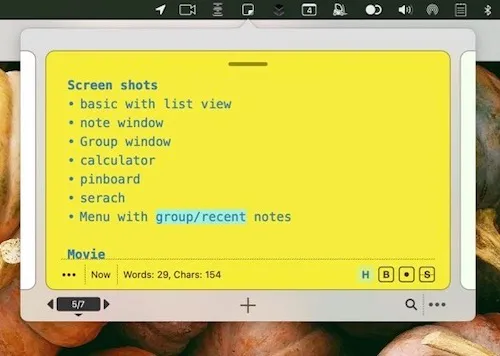
Sticklets is a menu bar note-taking app that mimics the quick-access feel of physical sticky notes, keeping text snippets, project notes, and brainstorming scratchpads available without switching away from active work. (Freemium, Pro $18.99 one-time or $9.99/year)
Notes float above other windows, so content remains visible while working in different applications. Quick note creation is available through a right-click context menu. Users can organize notes into projects grouped by date or color, search across all notes simultaneously, and link individual notes to one another for connected reference. The pinboard feature provides a canvas for rearranging and visually organizing collections of notes.
Additional capabilities include text snippet storage with drag-to-application support, word and character counting for selected text, drag-and-drop text services to strip formatting, and a built-in multi-line calculator that supports labeled calculations. This calculator feature sets Sticklets apart from simpler sticky-note utilities by addressing inline arithmetic needs without opening a separate tool.
System requirements: macOS 12 Monterey or later. App size is 2 MB. Available on the Mac App Store.
Pricing: Free tier available; Pro features unlock via $2.99/quarter, $9.99/year, or $18.99 one-time purchase.
Limitations: Last updated November 2022 (version 1.1.1), which may indicate slower active development. No iOS companion app for cross-device note syncing. The App Store listing lacks sufficient ratings to show a rating average.
Alternatives: Notchmeister and Tot (simpler text scratchpads with fewer organizational features), Creativit (more structured brainstorming canvas), or Apple Stickies (built-in macOS sticky notes without the menu bar focus model).
Suitable for users who want quick-access notes tethered to the menu bar with light project organization, without switching to a full note-taking application.


