
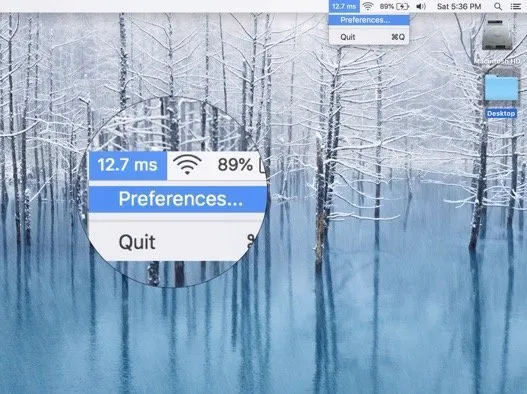
SimplePing displays real-time network latency in the menu bar, providing continuous connection quality monitoring without manual ping commands or Terminal access.
The app continuously pings a configurable target server (defaulting to google.com) and displays the current latency in milliseconds directly in the menu bar. Users can customize the ping destination to monitor servers relevant to their specific needs, such as regional endpoints for international collaboration.
Visual indicators provide immediate status recognition: green numbers indicate good connectivity, with color changes as latency increases. This enables peripheral awareness of connection quality without reading exact values. Clicking the menu bar icon provides access to settings for changing the target server and refresh interval.
Setup requires approximately two minutes. After installation, users select a ping destination and preferred update frequency. The app then operates autonomously, updating the display every few seconds.
Resource usage remains minimal at approximately 11.8 MB storage. The app runs efficiently in background operation. The October 2024 update streamlined the display to show integers only, removing decimal places for cleaner readability.
Requirements: macOS 10.13 or later. Available on Mac App Store for $0.99 (one-time purchase). Developed by Axel Guilbert (Sweatshop). Support available at axel@fluffy.es.
Limitations: Does not provide historical data, graphs, or detailed network diagnostics. Some users report occasional timeout errors. Focuses solely on ping monitoring without broader network analysis.
Alternatives: iStat Menus ($11.99, comprehensive system monitoring including network); Fing ($0.99, network scanning with device detection); PingPlotter ($0+, visual traceroute with history); native Terminal ping command (free, manual operation).
Suitable for users who need ambient connection quality awareness, particularly remote workers coordinating across time zones or those with inconsistent network conditions.


