notchification.carrd.co

Track build and compilation progress directly in your MacBook notch with animated progress bars. Designed for developers who want to monitor builds without constant tab-switching.

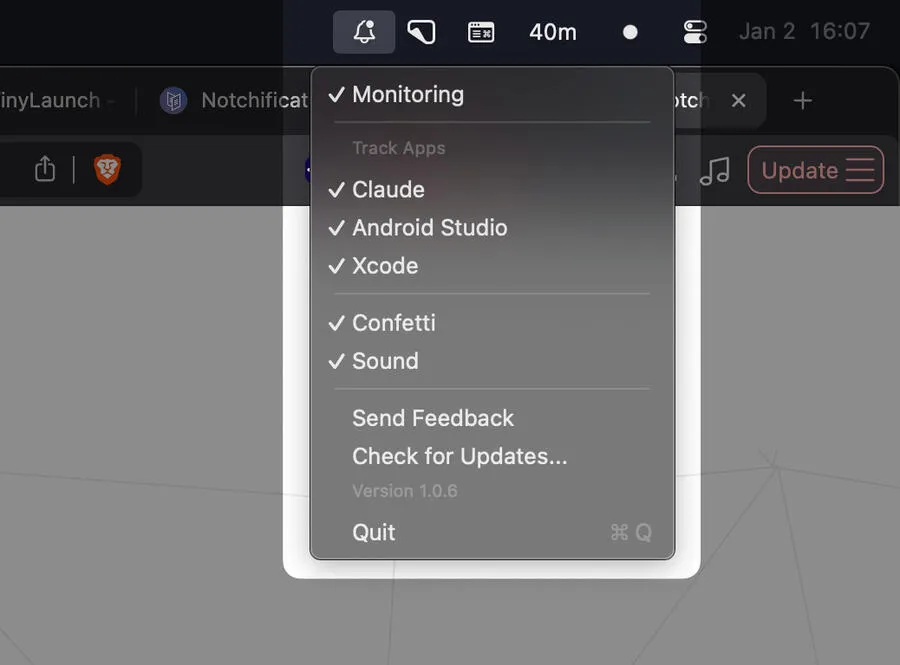
Notchifications screenshot showing the app interface

Anyone who compiles code regularly knows the ritual: start the build, switch to another window, forget you started it, check back five minutes later to find it finished three minutes ago. I’ve wasted hours of my life on this cycle.

Notchifications repurposes that controversial notch on MacBook Pros into something genuinely useful. The app displays an animated progress bar right in the notch area, tracking your build progress without requiring constant tab-switching or dock-watching. When the build completes, you get a confetti animation because apparently finishing a compilation should feel like a tiny celebration.

The concept is straightforward: the app monitors build processes from Xcode and Android Studio, presenting progress data in the one screen location you literally cannot avoid seeing. The notch sits there anyway, might as well make it work for you. During active builds, the progress bar updates in real-time, so you can keep working in your editor or reviewing documentation while staying aware of build status.

What makes this interesting is the execution. Rather than just showing a boring percentage, the app includes animation and visual polish. The confetti celebration when builds complete is unnecessary and delightful in equal measure. It transforms a mundane system notification into something that brings a small moment of satisfaction to your workflow.

The developer markets this as providing “40 minutes of extra relaxation” daily by eliminating anxious build-checking. That’s marketing hyperbole, but the core claim holds up. In my experience working on a MacBook Pro with the notch, having build status in peripheral vision does reduce interruptions. You can stay focused on writing code while the compilation happens in the background.

Performance overhead appears minimal from the promotional materials. The app runs as a lightweight menu bar utility with no dock icon, staying out of the way until you actually need it. For developers already dealing with resource-intensive IDEs and build tools, adding another system monitor is only worthwhile if the resource cost is negligible.

One significant limitation: this only works on MacBook Pro models with the notch. If you’re running an M2 MacBook Air, iMac, or older MacBook models, the app provides no value. The entire concept depends on that specific hardware design element. Additionally, support is currently limited to Xcode and Android Studio. Web developers using Vite or Webpack, Go developers, or anyone outside those two ecosystems won’t find this useful yet.

The app’s website doesn’t provide clear download instructions or pricing information, which is frustrating. Based on the Carrd promotional page structure, this appears to be either in development or an early release without established distribution. That uncertainty makes it difficult to recommend without reservation.

For developers who spend significant time compiling in Xcode or Android Studio and own a notched MacBook Pro, Notchifications addresses a real workflow friction point. The execution adds personality to an otherwise utilitarian function. But the narrow hardware and IDE compatibility means this serves a specific subset of Mac developers rather than the broader community.

If the developer expands IDE support to include more build tools and provides clear availability information, this could become genuinely valuable. For now, it’s an interesting concept with limited practical application.

Related Apps