
Quick Capture
Text Lens
Copying on-screen text with a keyboard shortcut.
The Catch Check supported languages against your macOS version.
A config string in a paused YouTube frame. Text Lens, LensOCR, and TextSniper grab it with a shortcut — on-device, no web OCR.
Quick Capture
Copying on-screen text with a keyboard shortcut.
The Catch Check supported languages against your macOS version.
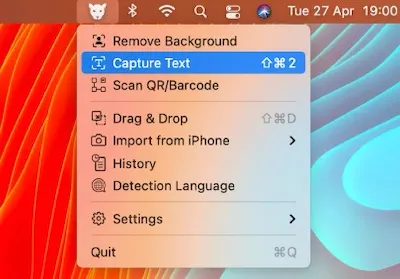
Paper to Text
Using an iPhone as a document scanner through Continuity Camera.
The Catch There is no capture history.
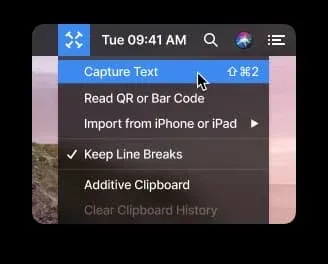
Read It Aloud
Combining OCR with text-to-speech and barcode capture.
The Catch Licensing differs between one Mac and multiple Macs.
| App | Best For | Price | The Catch |
|---|---|---|---|
| Text Lens | Copying on-screen text with a keyboard shortcut. | Paid | Check supported languages against your macOS version. |
| LensOCR | Using an iPhone as a document scanner through Continuity Camera. | Free · in-app purchases | There is no capture history. |
| TextSniper | Combining OCR with text-to-speech and barcode capture. | Paid | Licensing differs between one Mac and multiple Macs. |
A screencast showed a forty-character config string I needed. No transcript, no selectable text. I paused, squinted, typed it twice, got it wrong the first time. Same story with locked PDFs, error dialogs that eat clicks, and UI labels that refuse to highlight.
macOS Live Text already does OCR inside Photos, Preview, and Safari. It does not fire on a random region of a Zoom window or a YouTube frame. That gap is the whole product.
Text Lens ($6, one-time) is the one I reach for. Sindre Sorhus. Draw a rectangle, text hits the clipboard. Apple’s Vision framework, no account, no network. Eighteen-plus languages, stylized fonts, QR codes. macOS 14+.
If the documents are sensitive, “it never leaves the machine” is the feature. Recognition is under a second for normal UI text.
LensOCR ($4.99, one-time) is the same draw-to-clipboard loop, then Continuity Camera: point an iPhone at a printed sheet and the text lands on the Mac. No capture history — once you paste, it is gone. Fine if OCR is occasional. The Continuity path is why I would pick it over Text Lens for paper.
TextSniper ($7.99 one Mac, $11.99 unlimited) has been around longer. QR and barcodes, text-to-speech so I can hear a config string while looking at a keyboard, language packs that grow with the OS (Japanese, Korean, Ukrainian, Russian on Ventura+). Multi-Mac licensing is the reason to pay the extra four dollars.
Live Text first if you only need Preview and Safari. Text Lens if you live in video and dialogs. LensOCR if paper shows up. TextSniper if you work across two Macs or need TTS.
Selection notes summarize the linked app entries. Prices, compatibility and release status can change. Open the full review and confirm requirements with the developer before installing.