
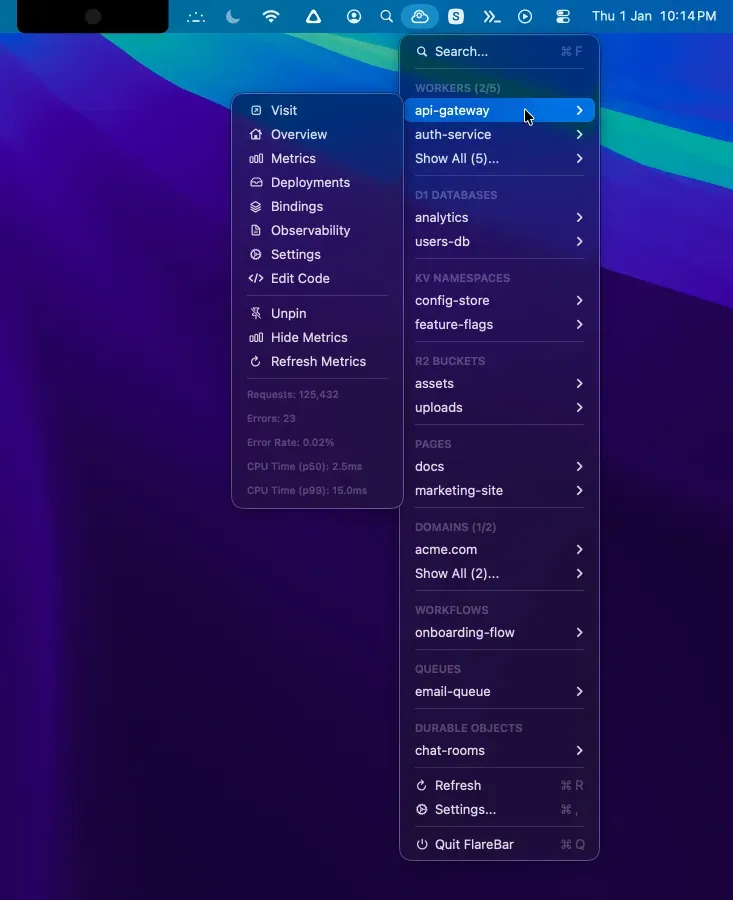
FlareBar is a native Mac menu bar utility that provides one-click access to Cloudflare dashboard resources. The app eliminates the need to navigate through multiple browser pages by enabling direct search and navigation to any Cloudflare resource.
The search functionality covers nine resource types including Workers, Pages, R2, D1, and Queues. Users can invoke the search with Cmd+F from anywhere, type a few characters, and jump directly to the desired resource. The app runs quietly in the menu bar with minimal resource usage, and search results appear nearly instantaneously.
The free version includes core resource searching and quick navigation capabilities. The Pro version ($49.99, one-time) adds live metrics display, pinnable favorite resources, customizable menu configuration, and support for multiple Cloudflare accounts. Distribution through the Mac App Store ensures secure payment processing and automatic updates.
FlareBar is independently developed and not affiliated with Cloudflare. The app is built with Swift and offers a straightforward, utilitarian interface focused on speed rather than visual polish.
System Requirements
- macOS 14.0 Sonoma or later
- Active Cloudflare account with API access
- Available via Mac App Store
Limitations
- Requires prior knowledge of resource names; no resource discovery or exploration features
- Independent development means potential maintenance concerns if Cloudflare significantly changes dashboard structure
- Pro tier pricing may be steep for individual developers with simple setups
Alternatives
- Browser bookmarks or Alfred/Raycast workflows for Cloudflare dashboard navigation
- Cloudflare CLI (Wrangler) for terminal-based resource management
- Direct browser navigation with saved shortcuts
Suitable for users who frequently access Cloudflare dashboard resources across multiple Workers, Pages, or storage services and want to reduce navigation friction.


