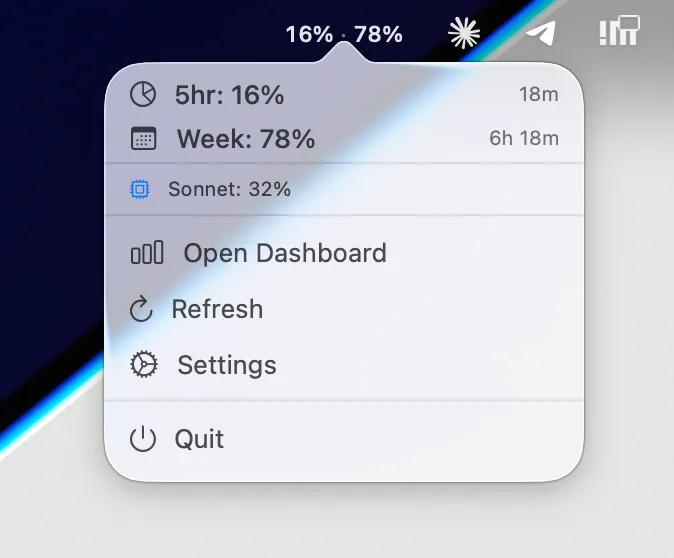
Claude Usage Systray displays real-time Claude.ai plan usage metrics directly in the macOS menu bar, eliminating the need to open a browser to check usage status. The app mirrors the data shown on claude.ai/settings/usage, providing immediate visibility into current session limits and weekly quotas.
The menu bar displays three key metrics: 5-hour session usage (resets approximately every 5 hours), 7-day all-models usage, and weekly Sonnet-specific usage (shown in the popover). Users can toggle between compact mode, which displays both 5-hour and 7-day metrics inline (e.g., “35% · 71%”), and normal mode, which shows only the weekly usage percentage alongside an icon.
Color-coded alerts automatically update based on configurable thresholds—defaulting to orange at 80% (warning) and red at 90% (critical)—with optional macOS notifications when usage crosses these boundaries. The app reads OAuth credentials directly from the macOS Keychain via the Claude Code application, requiring no separate authentication or manual token management.
Installation is available through Homebrew (brew tap adntgv/tap && brew install —cask claude-usage-systray) or manual download from the GitHub releases page. The application is notarized by Apple and integrates with Anthropic’s OAuth usage endpoint to retrieve plan data.
Requires macOS 13 or later and Claude Code installed and authenticated. The app is free and open-source under the MIT license. Note that it depends on an undocumented API endpoint that may change without notice, and functionality is contingent on Claude Code maintaining current credentials in the Keychain.
Suitable for Claude.ai users who frequently monitor plan usage, developers working with Claude API integrations, or anyone seeking quick visibility into session and weekly limits without browser context switching.


