Bluetooth Mic Switch app icon

Bluetooth Mic Switch

dunelly.github.io

Automatically switch to your Mac internal mic when connecting Bluetooth headphones - no more bad audio on calls or fiddling with settings.

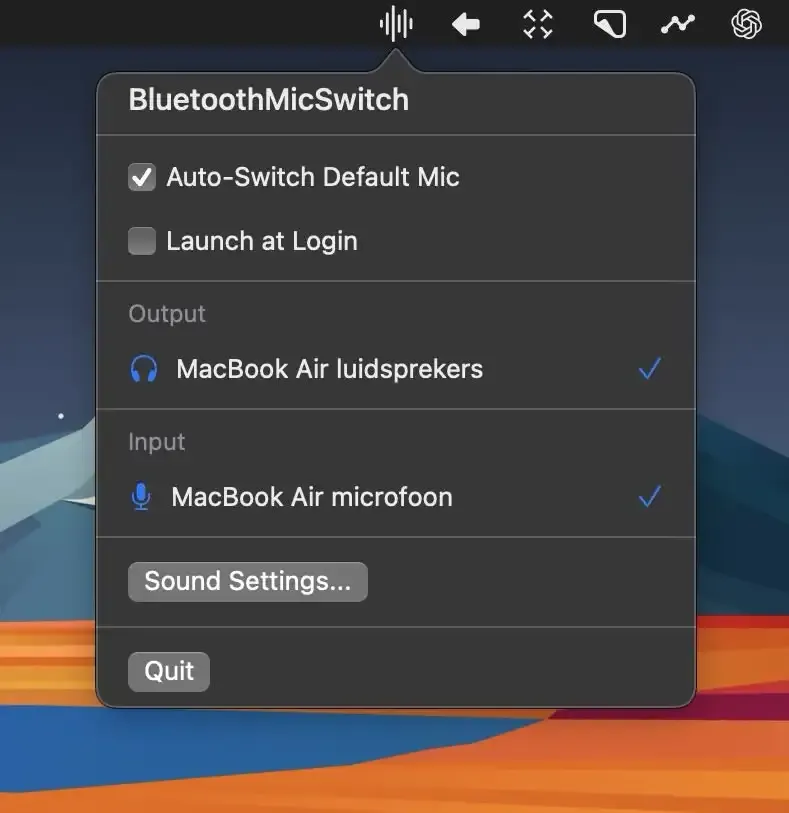
Bluetooth Mic Switch screenshot showing the app interface

Anyone who takes video calls with Bluetooth headphones knows the frustration. You connect your AirPods or Sony headphones, join the meeting, and within seconds someone asks, “Can you speak up? You sound really distant.” That’s Bluetooth microphone quality doing what it does best - making you sound like you’re calling from a tunnel.

I work with a distributed team across multiple time zones, which means I’m on video calls throughout my day. For months, I dealt with this same problem. My AirPods Pro would connect, macOS would automatically switch to the built-in Bluetooth microphone, and my audio quality would immediately tank. I’d have to open Sound Settings, switch the input back to my Mac’s internal microphone, and hope I didn’t miss too much of the conversation while fumbling through the settings.

Bluetooth Mic Switch solves this problem completely. This free, open-source app sits in your menu bar and automatically detects when you connect Bluetooth headphones. The moment your AirPods, Beats, Sony, or Bose headphones pair with your Mac, the app instantly switches your system’s audio input to the internal microphone. You get the good audio quality of your Mac’s built-in mic while still hearing everything through your headphones.

The technical reason this works: Bluetooth has bandwidth limitations. When you use both input and output over Bluetooth simultaneously, the connection switches to a lower quality codec to handle both streams. Your music or call audio quality drops, and your microphone sounds like a phone call from 2005. By routing input through your Mac’s internal mic and only using Bluetooth for output, you bypass this limitation entirely.

I’ve been using Bluetooth Mic Switch on my M2 MacBook Air for the past two weeks. The app works flawlessly. I connect my AirPods, the menu bar icon briefly flashes to confirm the switch, and I’m ready to join my next call with proper audio quality. My teammates immediately noticed the difference - no more complaints about my voice sounding muffled or distant.

The app is incredibly lightweight. It uses minimal system resources and runs entirely in the background. You can configure it to launch automatically at startup, which I’ve done. There’s no complicated setup or configuration required. Install it, grant the necessary permissions for audio device access, and it just works.

One practical consideration: this solution works best for video calls and meetings. If you’re recording audio or doing anything that requires capturing environmental sound, the Mac’s internal microphone will pick up more ambient noise than a close-proximity Bluetooth mic would. For those situations, you might want to use a dedicated USB microphone or the app’s menu bar controls to temporarily disable the automatic switching.

The developer has made Bluetooth Mic Switch completely free and open-source. The code is available on GitHub, which means you can verify exactly what it’s doing and contribute improvements if you’re technically inclined. The app requires macOS to function, though specific version requirements aren’t detailed in the documentation. Based on the implementation, it should work with any recent macOS version that supports standard audio routing.

Installation is straightforward. Download the DMG file from the GitHub releases page, drag the app to your Applications folder, and launch it. The app will request permission to control audio devices, which is necessary for its core functionality. Once you approve that, it begins monitoring for Bluetooth connections immediately.

After two weeks of daily use, Bluetooth Mic Switch has become one of those utilities I forget is even running until I need it. My AirPods connect, my audio input switches automatically, and I join calls without thinking about microphone settings. For anyone who regularly uses Bluetooth headphones for video calls, this app eliminates a persistent annoyance. The fact that it’s free and open-source makes it an obvious addition to any Mac that sees frequent meeting use.

Related Apps