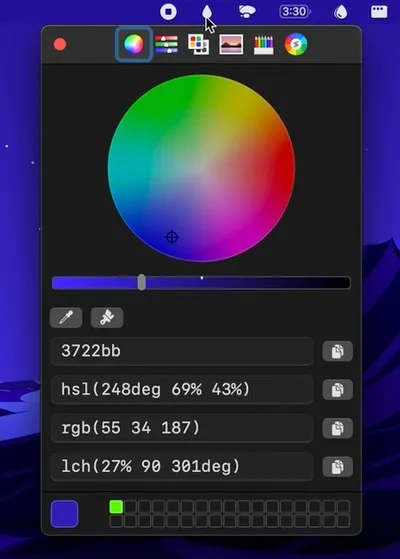
System Color Picker provides menu bar access to the native macOS color picker with extended functionality for copying, pasting, and converting colors across multiple formats. The app integrates the system’s built-in eyedropper tool and adds format conversion capabilities for Hex, HSL, RGB, Unit RGB (0-1), OKLCH, LCH, and CMYK values.
The menu bar interface displays recently picked colors for quick reference and reuse. Users can organize colors into custom palettes or import existing palettes in Simple Color Palette and Adobe Swatch Exchange (ASE) formats. A global keyboard shortcut enables color picking from anywhere on the screen without switching applications. The app supports macOS Shortcuts integration for automated color workflows.
Color values can be copied in any supported format and pasted into design applications or code editors. The app offers both menu bar and standard window display modes, with an optional always-on-top setting for persistent visibility during design work. The interface uses native macOS UI elements and adapts to system dark mode preferences.
System requirements: macOS 26.1 or later. Requires standard system accessibility permissions for the color picker eyedropper functionality.
Pricing: Free, available through the Mac App Store or direct download from the developer’s website.
Limitations: The macOS system color sampler displays RGB values only during active color picking, regardless of the selected output format. OKLCH chroma values display as percentages (0-100%) rather than decimal notation. Color conversions between different color spaces (Display P3 vs. sRGB) may result in slight value shifts. The app relies on macOS swatch management, preventing bulk deletion of saved colors.
Alternatives: ColorSlurp offers more advanced features including color palette generation and gradient tools at a premium price. Pika provides a simpler, focused color picker with fewer format options. Developers working primarily with hex values may find the built-in macOS color picker accessible via Digital Color Meter sufficient for basic needs.
Suitable for designers and developers who frequently work with colors across multiple formats and need quick access to the macOS color picker with enhanced conversion and palette management capabilities.


