
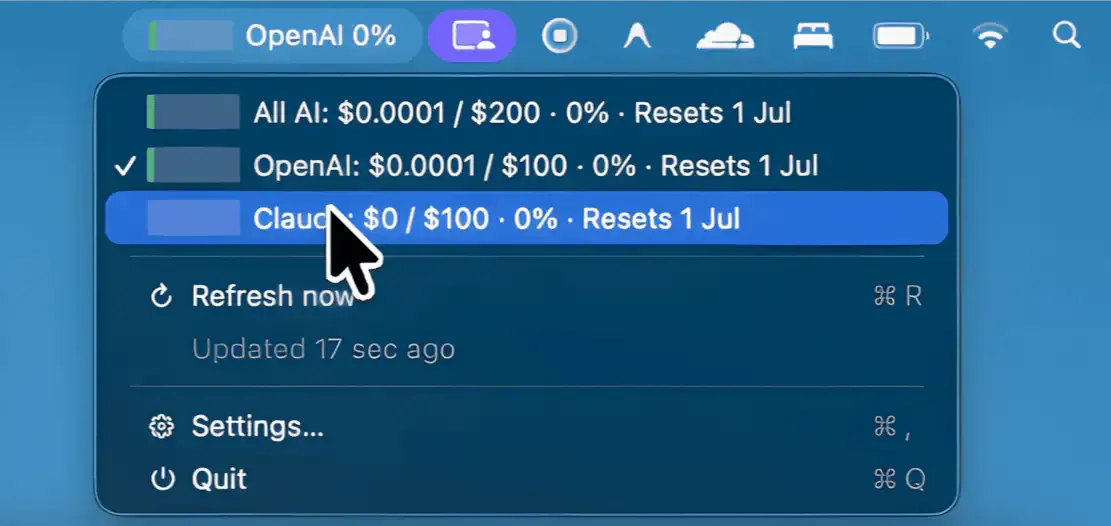
SpendBar displays live Anthropic and OpenAI API costs in the menu bar, providing budget tracking and multi-tier alerts to prevent unexpected charges. ($14.99, one-time)
The app tracks API spending separately for Anthropic and OpenAI, combining both into a single menu bar view. A color-coded status indicator shifts from green to amber to red as usage approaches configured budget thresholds. Alerts trigger automatically at 75%, 90%, and 100% of the set budget, giving advance warning before costs exceed limits.
Budget periods are flexible: users can reset on a specific monthly date or use a rolling 30-day window. The app tracks organization-wide spending across all team API keys, providing visibility at the admin level rather than per-key usage only. API keys are stored in macOS Keychain and spend history is processed locally, keeping billing data off external servers.
SpendBar is a native Swift app with no Dock icon and no Electron runtime, resulting in minimal resource usage. It supports both Intel and Apple Silicon architectures.
System requirements: macOS 14.0 Sonoma or later. Universal binary (Intel + Apple Silicon). No App Store listing; purchased directly from the developer website.
Pricing: ($14.99, one-time; launch price. Regular price $19.99.)
Limitations: Supports only pay-as-you-go Anthropic and OpenAI API accounts; ChatGPT Plus, Claude Pro, and Claude Max flat-rate subscriptions are not tracked. No mobile companion or web dashboard. Limited to these two API providers.
Alternatives: Usage tracking dashboards built into the Anthropic Console and OpenAI Platform provide free spend monitoring without a separate app. API cost monitoring tools like Helicone and LangSmith offer cross-provider tracking with additional analytics at the expense of requiring data routing through their platforms.
Suitable for users who make heavy use of Anthropic or OpenAI APIs on a pay-as-you-go basis and want real-time budget visibility without manually checking provider dashboards.

