
SoundRange
Freemium menu bar audio mixer with per-app volume, mute and level meters. Pro adds EQ, noise removal, ducking and profiles for $12.99 once.
- Price
- Free · optional Pro
- Requires
- macOS 15 or later
- Runs on
- Not Listed
- Size
- Not Listed
- Around Since
- Not Listed
- Open Source
- Not Listed
- Last Checked
- 2026-11-02
Free to start. Pro is a $12.99 one-time purchase with a 14-day free trial and no subscription.
 1 screenshot
At a Glance
Best For
Setting a separate volume for each app and switching audio devices from the menu bar.
The Catch
Noise removal, equalization, auto-ducking and custom profiles need the paid Pro tier, and macOS must allow System Audio Recording.
About SoundRange
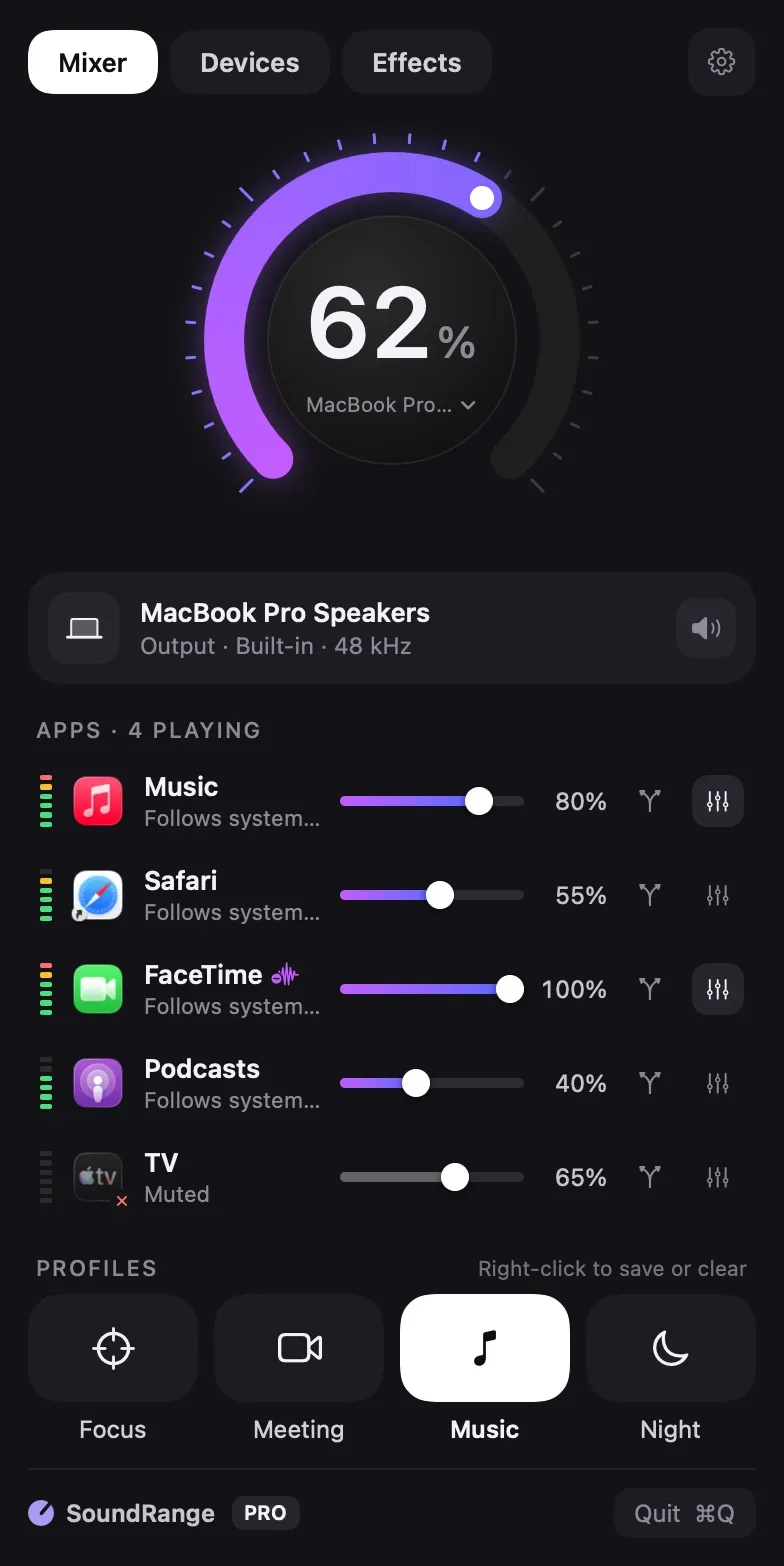
SoundRange opens a mixer from the menu bar. A large dial sets the output volume, and below it each app that is playing gets its own slider, mute button and live level meter. Tabs for Devices and Effects sit at the top, and profiles such as Focus, Meeting, Music and Night sit at the bottom.
The free tier covers per-app volume, muting and quick device switching. Pro adds noise removal, equalization, auto-ducking and custom profiles. The website also lists a 10-band EQ, per-app output routing, Volume Overdrive up to 150%, Shortcuts actions and display volume control for monitors that lack their own.
To control other apps, SoundRange needs System Audio Recording permission, which macOS asks you to grant once. Voice Isolation for the microphone needs microphone access. The website says no audio is recorded, nothing is sent over the network and there are no accounts or analytics.
On notched MacBooks the menu bar icon can hide behind the notch. The website lists this in its FAQ.
Sources checked on November 2, 2026: official site. This is a review of publisher documentation, not a hands-on test.
Consider These Alternatives
Different approaches to a similar job. Read each review before choosing.
FAQ
Why does SoundRange ask for System Audio Recording permission?+
It needs that permission to control the sound of other apps. macOS asks you to allow it once. The website says the audio passes through in memory in real time, with no recordings, no network connections, no accounts and no analytics.
How much does SoundRange Pro cost?+
Pro is a one-time purchase of US$12.99 with no subscription, and it has a 14-day free trial. The App Store shows local pricing, which can differ.
What does Pro add?+
The website lists noise removal, equalization, automatic volume ducking and custom audio profiles as Pro features.
Can SoundRange control monitors without their own volume?+
Yes. The website lists display volume control for monitors that have none of their own.