FineTune
Open-source per-app volume mixer with multi-device routing, 10-band EQ, and volume boost up to 400%
- Price
- Free
- Requires
- macOS 15 or later
- Runs on
- Apple Silicon / Intel
- Size
- 5.4 MB
- Around Since
- 2026
- Open Source
- Yes
- Last Checked
- 2026-10-31
License: GPL-3.0
 1 screenshot
At a Glance
Best For
Per-app volume, equalization and audio output routing.
The Catch
Only apps currently producing audio appear, and helper processes can need a restart.
About FineTune
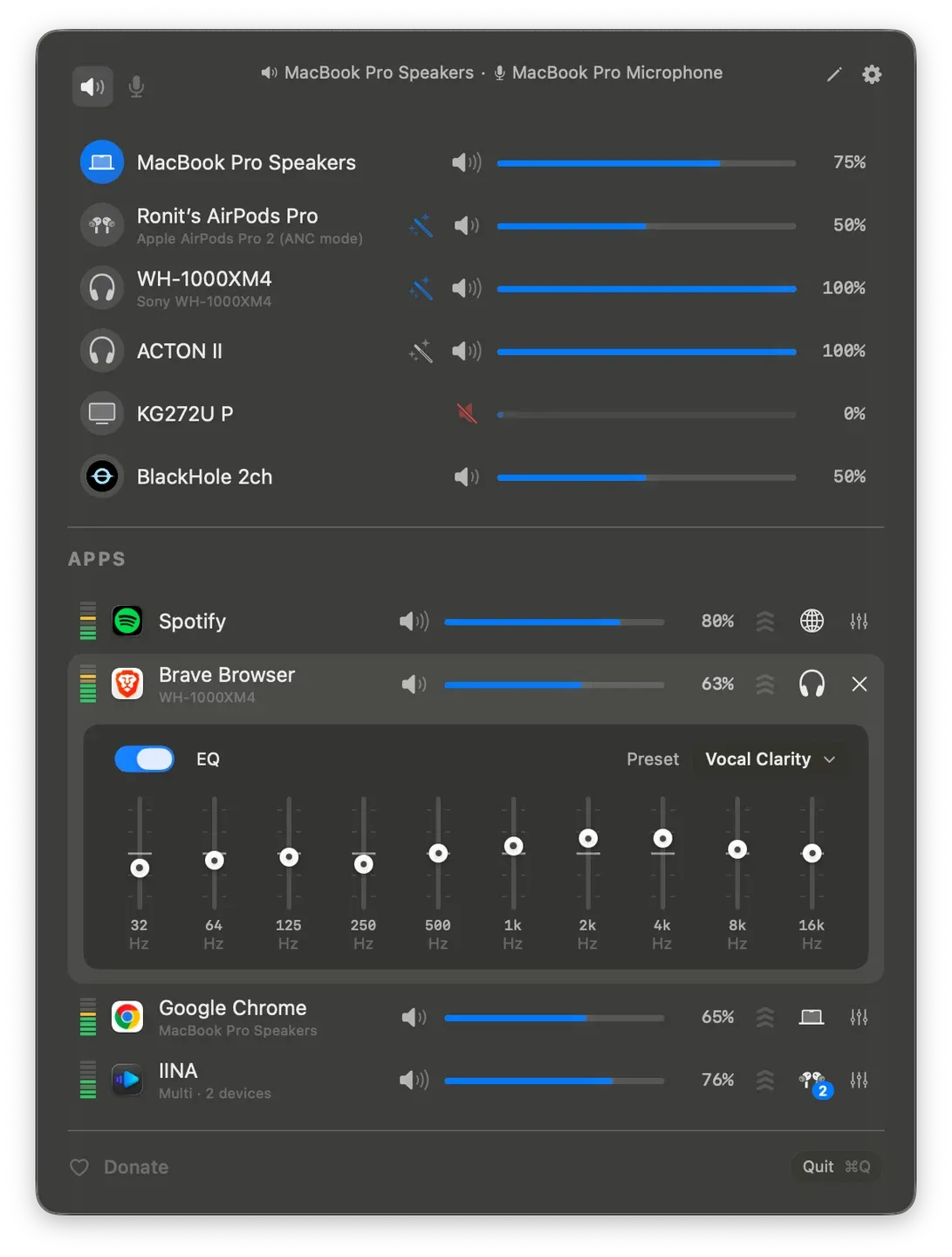
FineTune provides individual application volume control and audio routing from the macOS menu bar with per-app sliders, mute controls, and multi-device output assignment. The app enables sending different applications to different speakers simultaneously with automatic device fallback. (Free, open-source)
The volume mixer displays only applications actively playing audio with independent control for each source. Features include a 10-band equalizer with 20 presets across 5 categories, input device level monitoring for microphone management, and volume amplification up to 400% for quiet audio sources.
Monitor speaker control operates via DDC protocol for compatible external displays. Device priority settings provide automatic fallback when preferred outputs disconnect. URL scheme automation enables scripting integration for programmatic control through external tools.
Built with Swift and SwiftUI as a native macOS application licensed under GPL v3 with publicly available source code. The project has accumulated 4.2k GitHub stars across 348 commits from 10 contributors. Installation is available via Homebrew (brew install --cask finetune) or manual download from GitHub releases.
Audio capture permission is requested on first launch for system-level access. Pinned app pre-configuration maintains volume settings across sessions.
System requirements: macOS 15.0 (Sequoia) or later. Compatible with Intel and Apple Silicon processors.
Limitations: Only displays applications currently playing audio—silent apps do not appear in the interface. Some applications using helper processes may require restart for detection. Microphone permission must be granted separately for input device visibility. Recent macOS version requirement limits compatibility.
Alternatives: SoundSource (paid, comprehensive), Background Music (free, open-source), eqMac (free, EQ-focused), BlackHole (audio routing).
Suitable for users who need independent volume control across multiple applications or complex audio routing setups. Best for content creators managing multiple audio sources, podcasters, musicians using DAWs alongside other apps, or power users requiring per-app EQ customization.
Consider These Alternatives
Different approaches to a similar job. Read each review before choosing.
FAQ
What does FineTune do?+
FineTune adds per-app volume sliders, mute controls, and multi-device output routing in the macOS menu bar. It includes a 10-band equalizer with 20 presets across 5 categories and volume amplification up to 400% for quiet sources.
Is FineTune free?+
Yes. FineTune is free and open-source under the GPL v3 license.
How do I install FineTune on macOS?+
Install with Homebrew using `brew install --cask finetune`, or download the latest .dmg from the GitHub releases page at https://github.com/ronitsingh10/FineTune.
Does FineTune run on Apple Silicon?+
Yes. FineTune runs on Apple Silicon (M1, M2, M3, M4) and Intel Macs. It requires macOS 15.0 (Sequoia) or later.
Why don't I see all my apps in FineTune?+
FineTune only displays applications currently playing audio. Silent apps do not appear, and some applications using helper processes may require a restart before they are detected. Microphone permission must be granted separately for input device visibility.
Can FineTune control external monitor speakers?+
Yes. Monitor speaker control works via the DDC protocol on compatible external displays. Device priority settings provide automatic fallback when a preferred output disconnects, and a URL scheme exposes programmatic control for scripting.