SleepBar provides scheduled sleep management from the menu bar, enabling users to set when their Mac should sleep or when the display should turn off after completing background tasks.
The app addresses the need to schedule Mac sleep after time-based activities like backups, media conversions, or downloads. Rather than manually returning to sleep the system or setting reminders, users configure a timer and the app handles the rest.
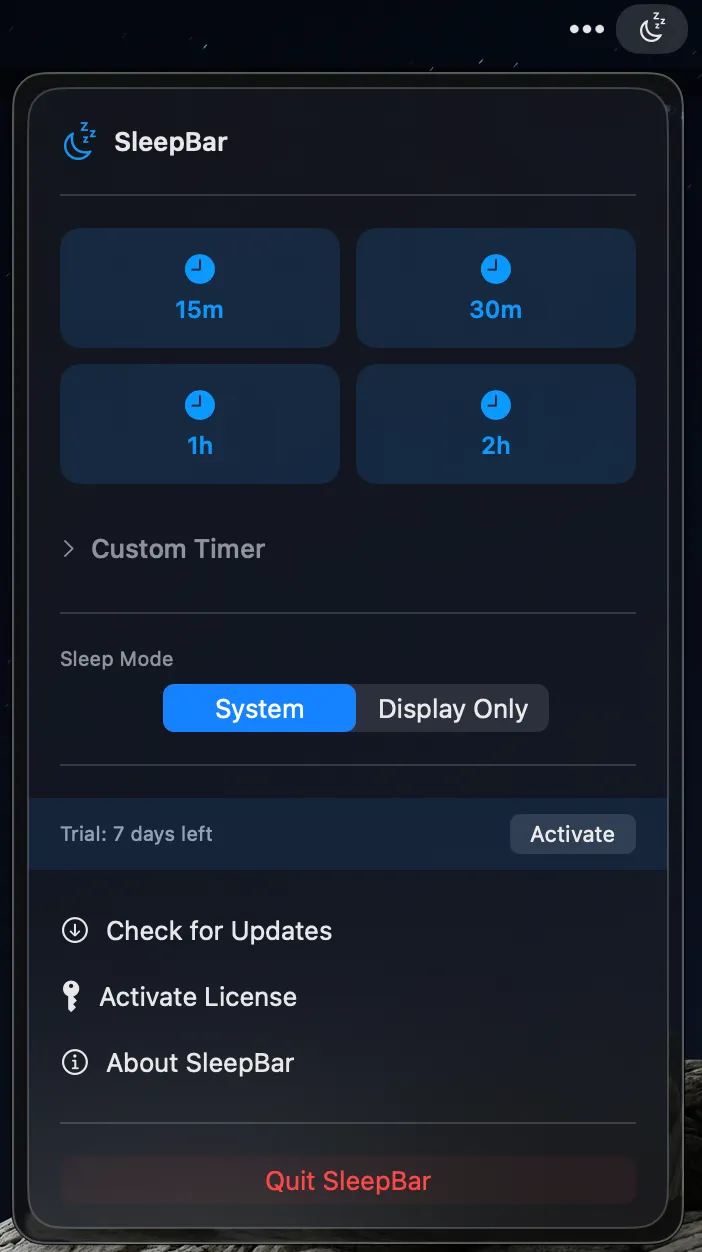
Quick preset timers include 15, 30, 60, and 120 minutes, with custom duration support for hours and minutes precision. Specific time scheduling allows setting exact sleep times (e.g., midnight or 2 AM) for predictable overnight task completion. The app distinguishes between full system sleep and display-only mode.
A notification appears one minute before scheduled sleep with options to cancel or extend the timer, preventing interruption when users return to active work unexpectedly. This thoughtful warning system reduces timer-related frustration.
The interface follows Apple design principles with what the developer describes as “liquid glass design” matching macOS Sonoma aesthetics. The app integrates naturally without reinventing interface conventions.
The app is open source and available on GitHub. A 7-day free trial requires no credit card. While macOS includes sleep scheduling in Energy settings, the built-in option lacks quick timers or one-time schedule flexibility.
Requirements: macOS 14.0 (Sonoma) or later. Available for $4.20 (lifetime license) covering up to three Macs with all future updates included. Developed by Nate O’Farrell.
Limitations: Requires macOS 14.0 minimum; users on older versions cannot use the app. Focuses specifically on sleep scheduling rather than preventing sleep.
Alternatives: Sleepr (free, sleep timer restoration); Amphetamine (free, prevents sleep with triggers); Lungo ($4.99, prevents sleep on demand); native Energy settings (free, limited flexibility).
Suitable for users who run overnight tasks and want automatic sleep scheduling, or those seeking time-based screen time limits without manual intervention.