
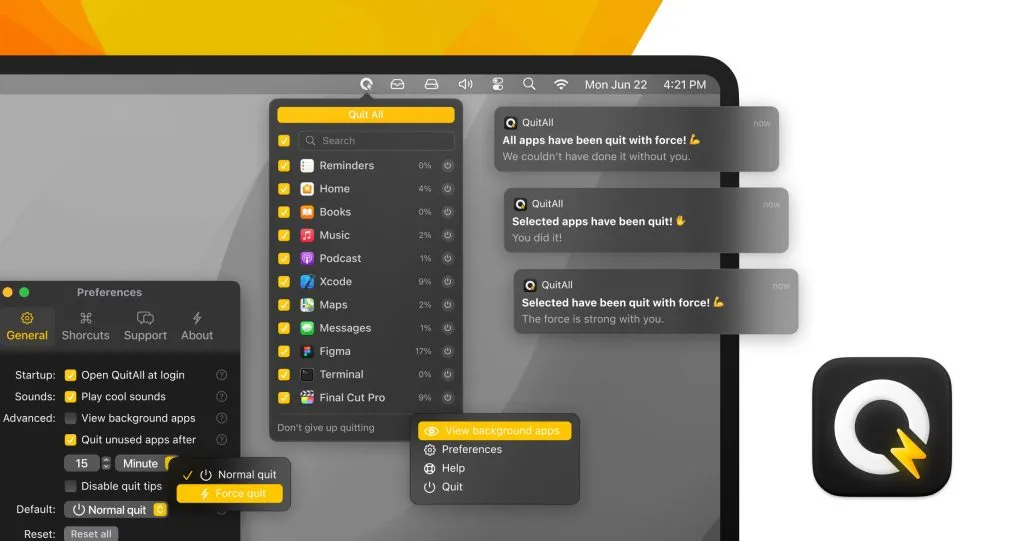
QuitAll provides centralized control over running applications with real-time resource monitoring. The app displays all active applications with CPU and memory usage percentages, enabling quick identification of resource-intensive processes and selective or bulk termination.
The interface separates regular applications from system processes, preventing accidental termination of critical components like Finder. Individual apps can be quit selectively, multiple apps can be selected for simultaneous termination, or all non-essential applications can be closed at once. Force quit functionality is available for unresponsive applications, clearly marked to prevent accidental use.
An auto-quit feature automatically closes unused applications after a configurable timer period (e.g., 15 minutes). This maintains system cleanliness without manual intervention for users who accumulate many open applications throughout the day.
The interface displays application lists with quit buttons and usage statistics. Customizable keyboard shortcuts and sound notifications are available. Dark mode support matches macOS system preferences with a compact design that minimizes screen occupation.
Administrator permissions are required to quit certain system-level applications, which may trigger permission dialogs for protected apps during operation.
Installation is available via direct DMG download from Amico Apps or through Setapp subscription. Pricing is $14.99 one-time purchase with a free trial available. The developer provides regular updates for new macOS versions.
System requirements include macOS with standard application management permissions. No cloud accounts or analytics are involved, with fully local operation.
Alternatives include Activity Monitor (built into macOS) for basic process management, though without the streamlined interface or auto-quit automation.
Suitable for users who accumulate many running applications throughout the day, want centralized visibility into resource usage, or need the convenience of batch application termination without restarting.


