
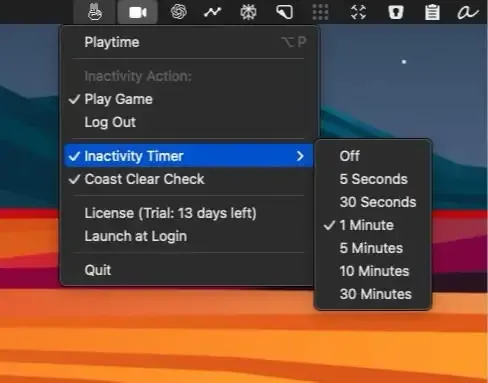
Peace provides dual-purpose functionality for Mac users: keeping the system awake through interactive gameplay or automatically securing the machine when the user is absent. The app operates from the menu bar with a set-and-forget approach to managing sleep behavior and security.
The app offers two primary modes. Play Mode activates a Pong-like game that uses the cursor to control a paddle, preventing system sleep through continuous interaction. This mode functions as an interactive alternative to traditional mouse jiggler utilities. Coast Clear mode monitors user presence and can either maintain the game or trigger an automatic logout when inactivity is detected. The app integrates with communication platforms including Teams, Slack, and Zoom to maintain active status during extended sessions.
Peace includes a timer configuration system allowing users to set specific duration limits for each mode. The app provides a Lock Screen option as an alternative to full logout, offering a middle ground between staying awake and complete security. All presence detection occurs on-device rather than through cloud-based monitoring, maintaining user privacy.
The app requires macOS 14 or later. Pricing starts at $1.99 for a single device license or $4.99 for a three-device license, both as one-time purchases with no subscription. A 14-day free trial allows users to test functionality before purchase. The current version (1.0.1) includes Play Mode with paddle control, Lock Screen functionality, and stability improvements.
Limitations include the macOS 14+ requirement, which excludes older systems. The Pong-like game interaction may not suit users who prefer completely passive keep-awake solutions. Users seeking more granular control over sleep prevention conditions (such as specific application triggers or network activity monitoring) may find the app’s mode-based approach less flexible than utilities like Amphetamine or KeepingYouAwake.
Peace is suitable for remote workers who need to maintain active status on communication platforms during extended periods, users who frequently run long processes that require system wakefulness, and security-conscious individuals who want automated logout functionality when stepping away from their workstation.


