
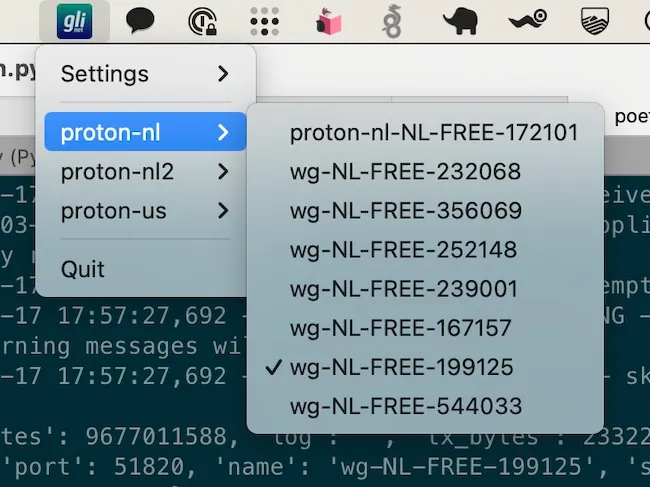
Glinet Wireguard enables rapid switching between WireGuard VPN peers on GL.iNet routers directly from the macOS menu bar. The app addresses scenarios where VPN servers reach capacity or users need to change connection endpoints without manual router configuration. (Free, open-source)
The menu bar interface provides one-click access to configured WireGuard peers. Users can toggle between different VPN connections without opening the GL.iNet router’s web interface or mobile app. The app communicates directly with GL.iNet devices through a modified python-glinet library that resolves initialization issues with the standard implementation.
The application is lightweight and purpose-built for GL.iNet router owners who use WireGuard. Setup requires Poetry dependency management and existing WireGuard configurations on the target GL.iNet device. Pre-built releases are available for Apple Silicon Macs, with M1 compatibility confirmed by the developer.
The project is actively maintained with the latest release (v0.1.3) published in March 2024. The codebase is 100% Python and distributed under the MIT license. Source code and compiled releases are available on GitHub.
System requirements: macOS (tested on MacBook Air M1). Requires GL.iNet router with WireGuard configured. Python environment needed if building from source.
Limitations: Specifically designed for GL.iNet routers only—does not support standard WireGuard configurations or other router brands. Limited documentation may require technical familiarity for initial setup. No native interface for adding new peers; configuration must be done through GL.iNet’s standard tools.
Alternatives: Native WireGuard app (supports any WireGuard configuration), Wireguard Tools (broader WireGuard management), router web interfaces (universal but slower).
Suitable for GL.iNet router owners who frequently switch between WireGuard peers and prefer menu bar convenience over web-based management interfaces.


