
DropSweep
An open-source menu bar utility that scans the Downloads folder, groups clutter by category, and moves unwanted items to Trash in a single click.
- Price
- Free
- Requires
- macOS 26 or later
- Runs on
- Apple Silicon / Intel
- Size
- 2.6 MB
- Around Since
- 2026
- Open Source
- Yes
- Last Checked
- 2026-10-31
(Free, open-source; MIT license)
 1 screenshot
At a Glance
Best For
Clearing installers, archives and screenshots out of the Downloads folder.
The Catch
It requires macOS 26 or later and cleans only the Downloads folder.
About DropSweep
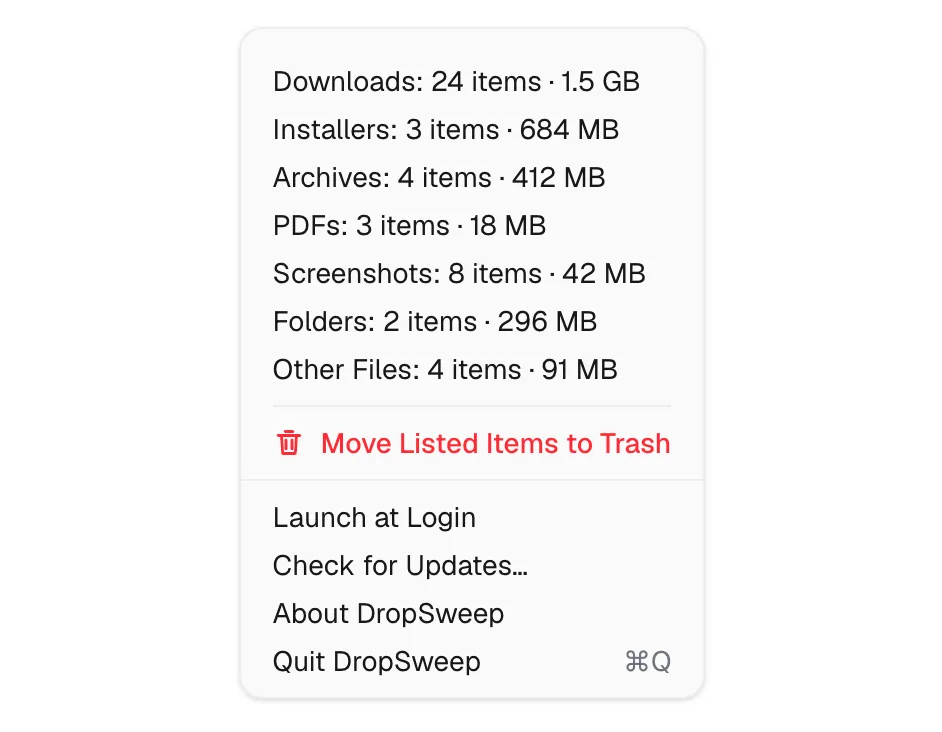
DropSweep is a free, open-source menu bar utility that helps maintain a clean Downloads folder by scanning its contents, grouping files into categories, and enabling one-click removal of clutter. It runs from the menu bar with no account or configuration required. (Free, open-source)
The app displays an item count in the menu bar, giving a quick view of how much has accumulated in Downloads. Opening the menu reveals files grouped into six categories: Installers (.dmg, .pkg files), Archives (.zip, .xip, .tar), PDFs, Screenshots, Folders, and Other. Each category shows a count, and users select which groups to send to Trash. Items are moved to Trash rather than permanently deleted, allowing recovery from accidental sweeps.
DropSweep includes a launch-at-login option and an update checker. The app’s design philosophy is minimal — it does not monitor folders in real time, prompt for additional permissions, or manage files outside the Downloads directory. Hidden files at the top level of Downloads are excluded from cleanup, preventing accidental removal of dot-files or system-managed items.
The source code is available on GitHub under the MIT license, and the project targets macOS 26 Tahoe using Swift 6. As version 0.3.6, the app is actively maintained with recent releases.
System requirements: macOS 26 (Tahoe) or later; no additional permissions required beyond standard file access.
Pricing: (Free, open-source; MIT license)
Limitations: Scans Downloads folder only — does not manage other directories. No real-time folder monitoring. Requires macOS 26, which limits availability to users on the latest system version. Category recognition is limited to six predefined file type groups.
Alternatives: Hazel ($42, one-time) provides rule-based folder automation across any directory. Gemini 2 ($19.99/year) scans for duplicate files across the system. The built-in macOS Downloads folder sorting by date or kind provides a free, manual alternative.
Suitable for users who want a lightweight, no-cost tool for quickly clearing common download clutter without a full-featured folder automation system.
FAQ
What does DropSweep do?+
DropSweep scans the macOS Downloads folder, categorizes its contents into groups such as Installers, Archives, PDFs, Screenshots, Folders, and Other, then lets users move unwanted categories to Trash in one click. Items go to Trash, not permanent deletion.
Is DropSweep free?+
Yes. DropSweep is free and open-source under the MIT license. The source code is available at https://github.com/timokoethe/DropSweep.
How do I install DropSweep on macOS?+
Download DropSweep from https://dropsweep.itstimo.me or build it from source at https://github.com/timokoethe/DropSweep. The app requires macOS 26 (Tahoe) or later.
Does DropSweep run on Apple Silicon?+
DropSweep is written in Swift 6 and targets macOS 26 (Tahoe). Compatibility with both Apple Silicon and Intel Macs is expected based on the standard Swift toolchain.
What file types does DropSweep recognize?+
DropSweep categorizes files into six groups: Installers (.dmg, .pkg), Archives (.zip, .xip, .tar), PDFs, Screenshots, Folders, and Other. Each category appears with an item count before deletion.
Are hidden files in Downloads affected by DropSweep?+
No. Hidden files at the top level of the Downloads folder are not affected by DropSweep's cleanup operations, providing a safety margin for dot-files and system-managed content.