
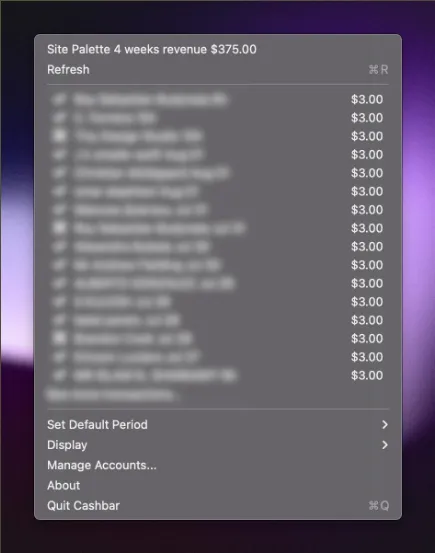
CashBar is a native macOS menu bar utility that displays Stripe earnings and transaction activity in real-time. The app provides at-a-glance balance visibility without requiring access to the full Stripe dashboard.
Setup involves adding a Stripe secret key, after which the menu bar icon displays the current balance. Clicking reveals detailed information including recent transactions. The app supports multiple Stripe accounts, enabling management of different projects or businesses from a single interface.
All sensitive data is stored locally in macOS’s encrypted keychain rather than external servers, addressing privacy considerations common with financial applications. The interface adapts automatically to system light and dark mode preferences.
The app maintains a minimal footprint: approximately 5MB application size and 25MB RAM usage during operation. Built as a native macOS application rather than Electron, performance impact is negligible.
Pricing: $1.50/month subscription. Available through Mac App Store and direct download. Apple notarized.
System requirements: macOS 10.13 or newer. Compatible with Intel and Apple Silicon Macs.
Limitations: The app focuses exclusively on Stripe—users with PayPal, Square, or other payment processors require separate solutions. Analytics capabilities are limited to basic balance and transaction viewing; complex business analysis still requires the full Stripe dashboard. The subscription model means ongoing cost rather than one-time purchase.
Alternatives: No direct menu bar alternatives for Stripe monitoring. Users requiring multi-processor support may need browser-based dashboard access or dedicated financial management applications.
Suitable for users who run Stripe-based businesses and need quick earnings visibility throughout the day—entrepreneurs, freelancers, and small business owners who monitor transaction activity regularly without wanting constant dashboard access.


