
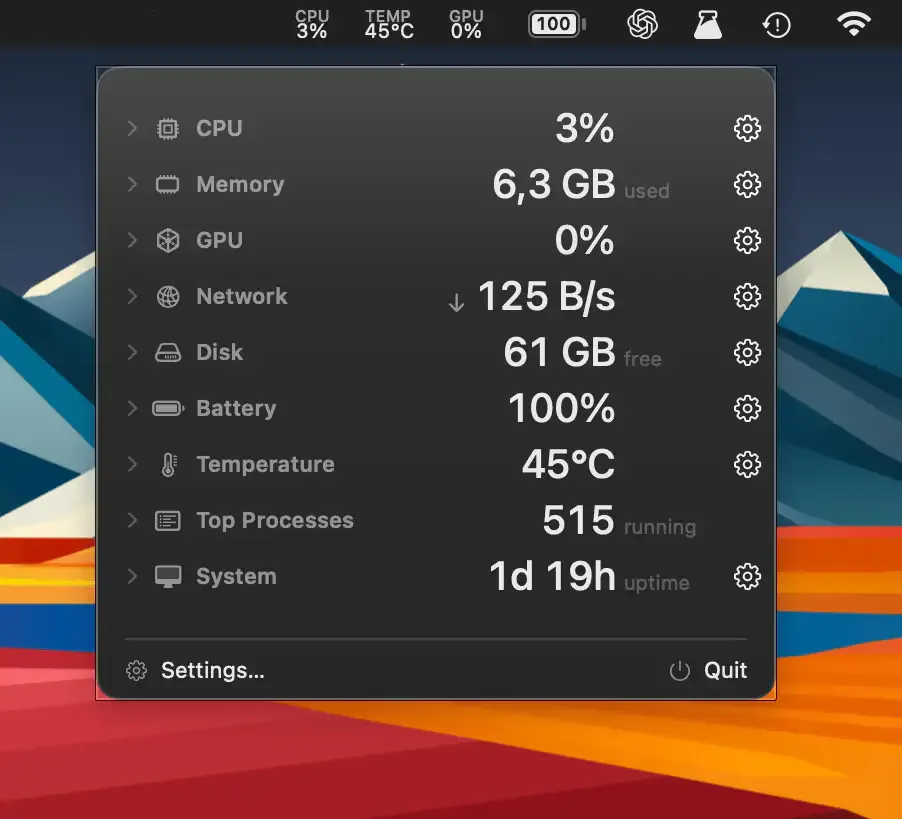
AirStats is a free, lightweight system monitor for macOS that surfaces up to 16 customizable metrics in the menu bar and supports an optional desktop widget for persistent display. (Free, open-source)
The app monitors per-core CPU load, memory pressure, GPU usage, network upload and download throughput, disk read/write activity, battery percentage and health, and multiple temperature sensors. Each metric can be individually enabled or disabled, allowing users to build a compact status bar display tailored to their monitoring needs. Customizable color schemes and keyboard shortcuts provide additional control over the interface.
Threshold-based notifications alert users when metrics exceed defined limits — for example, when memory pressure is high or when network throughput drops below an expected baseline. The optional desktop widget provides a persistent overlay for users who prefer always-visible system data without clicking the menu bar.
The app’s resource impact is minimal at 0.046% idle CPU usage and a 4.6 MB install size. It runs as a single process with no launch agents or background helpers, and its MIT-licensed source code allows independent inspection.
System requirements: macOS 14 or later. Apple Silicon Mac required (Intel not currently supported). 4.6 MB.
Pricing: (Free, open-source — MIT License)
Limitations: Intel Mac support is not available in the current release. The app does not include historical graphing or data logging; metrics are displayed as current values only. No direct App Store distribution — download is from the official website.
Alternatives: iStatistica Pro is a comprehensive paid alternative with historical graphs and more display options ($19.99). Stats is a free open-source alternative with Intel support and a broader Mac compatibility range. MacMonitor is a simpler free alternative covering only four core metrics.
Suitable for users on Apple Silicon Macs who want a highly customizable, privacy-respecting system monitor with no ongoing cost.


