
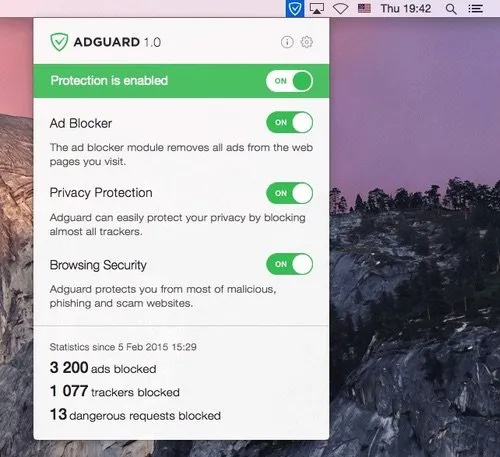
AdGuard for Mac is a standalone ad blocker that operates at the system level, blocking advertisements, trackers, and phishing content across all browsers and applications from a single menu bar interface. Unlike browser-extension-based blockers, it does not require separate extensions for each browser. (Paid, 14-day trial)
The menu bar provides quick access to protection status, recent filtering statistics, and allow/block controls. The app filters traffic system-wide using over 300,000 filtering rules — significantly more than most browser extensions — covering ads, third-party trackers, analytics scripts, and known phishing domains. A Stealth Mode option suppresses additional web analytics, cookie banners, and referrer headers.
AdGuard includes a Tracking Protection filter that blocks analytics platforms and advertising networks, as well as a Security filter that warns users before visiting known phishing or malware-hosting domains. The app also provides per-application filtering controls, allowing users to exclude specific apps from having their traffic filtered. Filtering statistics track the number of blocked requests, DNS responses, and unique trackers encountered.
System requirements: macOS 12 Monterey or later, 2 GB RAM, 120 MB free disk space.
Pricing: Paid with 14-day trial. Available as an annual subscription or lifetime one-time payment; Personal license covers 3 devices, Family license covers 9 devices.
Limitations: HTTPS filtering requires installation of a trusted root certificate in the macOS keychain, which some users may prefer to avoid on privacy or security grounds. Disabling HTTPS filtering reduces blocking effectiveness on encrypted connections. macOS 12 minimum excludes users on older systems. No permanent free tier after the trial period.
Alternatives: uBlock Origin (browser extension, free, open-source, no root certificate required), 1Blocker (system-wide blocker with Safari focus, subscription-based), Little Snitch (network firewall with outbound traffic control, broader scope than ad blocking).
Suitable for users who want comprehensive system-wide ad and tracker blocking across all applications without managing separate browser extensions for each browser.


