
WattMate
Battery monitoring app that measures per-app power draw in watts and shows how many minutes of battery life you regain by quitting each app.
- Price
- Free · optional purchases
- Requires
- macOS 14 or later
- Runs on
- Apple Silicon
- Size
- 6.4 MB
- Around Since
- 2026
- Open Source
- No
- Last Checked
- 2026-10-31
Free tier; Pro is $9.99 a year or $19 once at the launch price, after a 10-day trial of the full app.
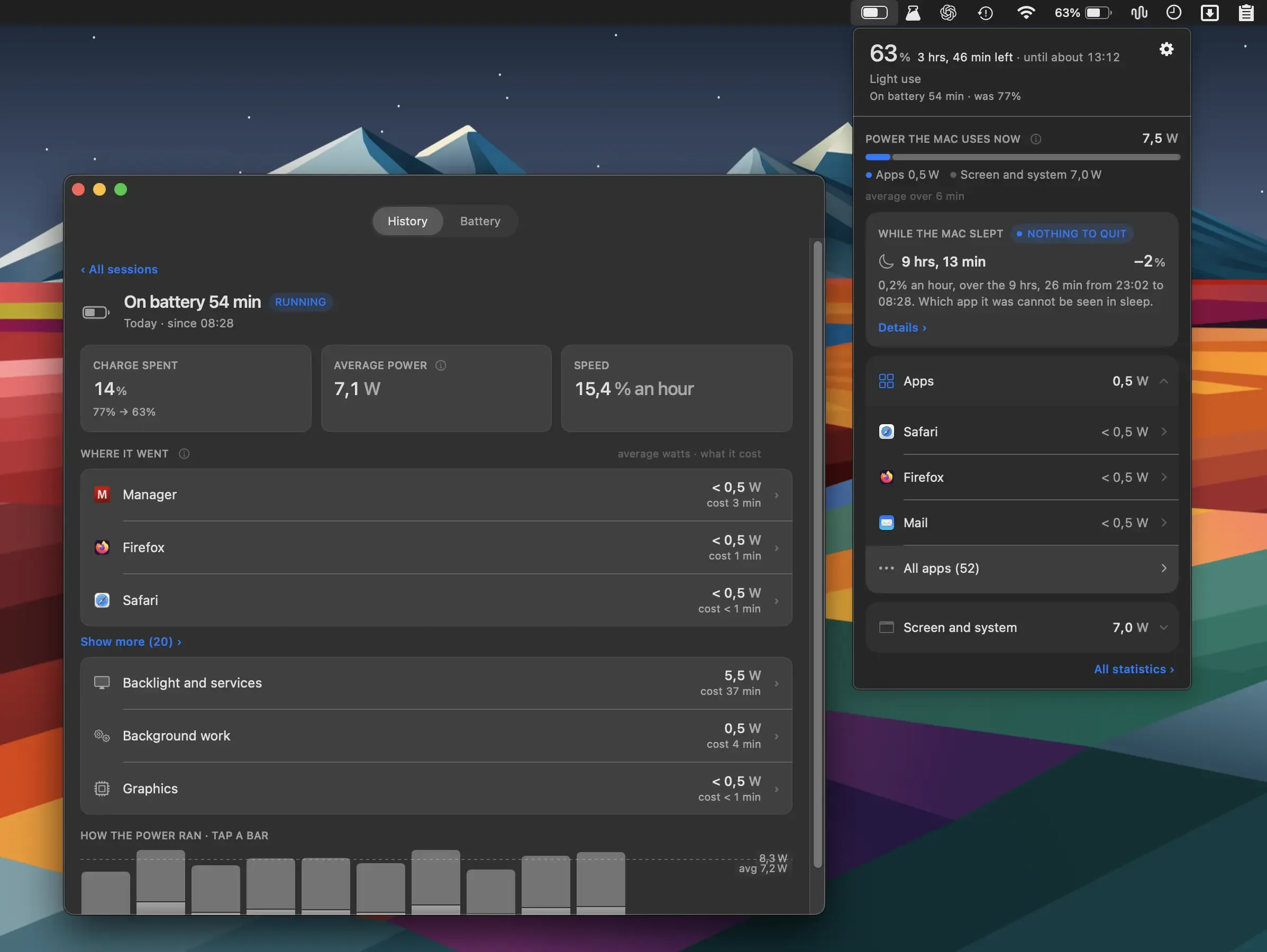
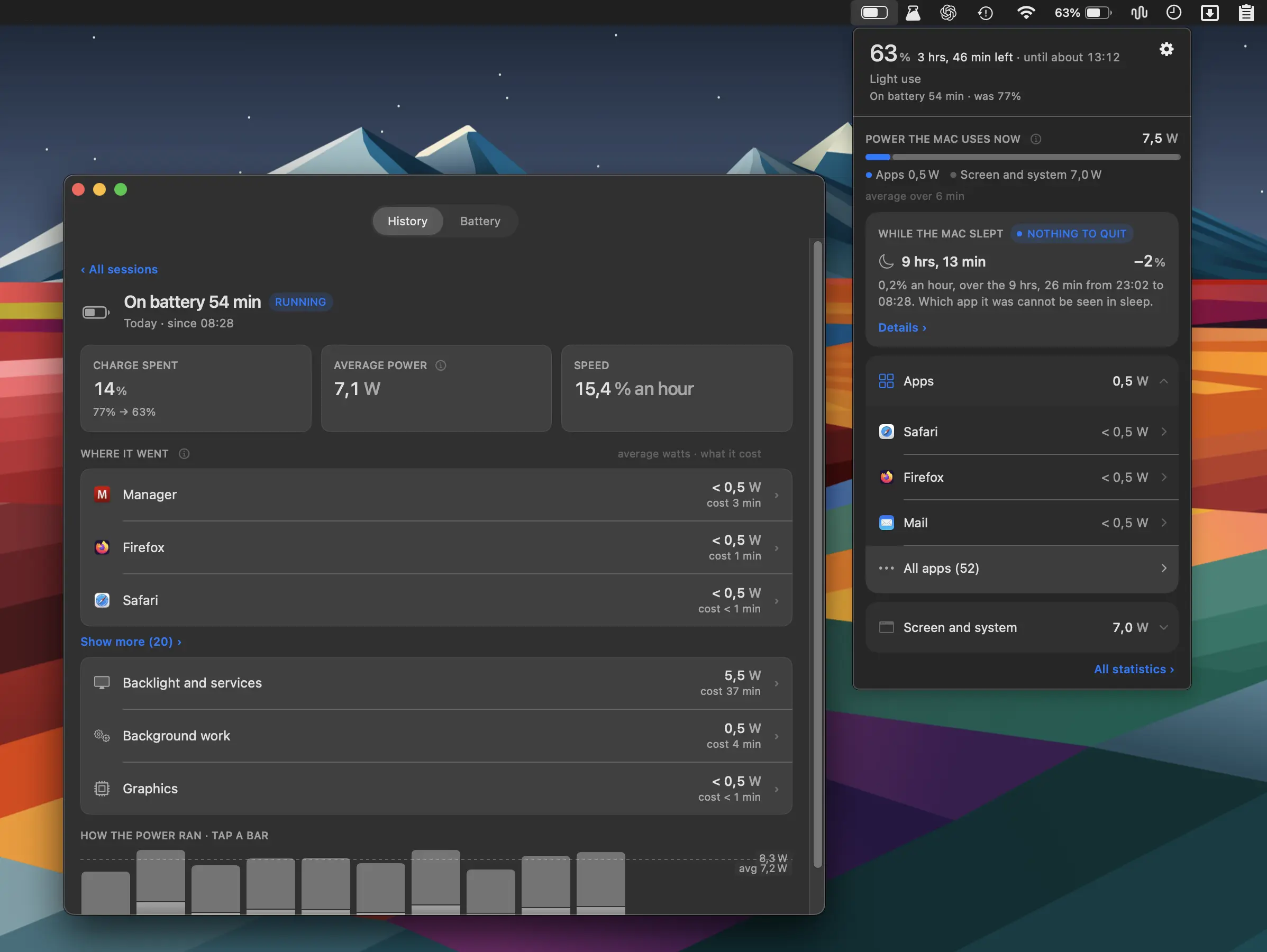 1 screenshot
At a Glance
Best For
Seeing which apps drain a MacBook battery, in watts and minutes.
The Catch
It runs only on Apple Silicon, and history, totals and battery ageing need Pro.
About WattMate
WattMate is a menu bar utility that measures per-app power consumption in real watts and translates that data into actionable battery-time projections on Apple Silicon Macs. (Free tier; Pro $9.99/year or $19 one-time)
The menu bar interface lists running applications ranked by current power draw, with each entry showing the wattage consumed and an estimate of how many minutes of battery life would be recovered by quitting the app. Rather than using abstract efficiency scores, WattMate reports actual hardware power telemetry from Apple Silicon’s internal sensors. A verification step re-measures power draw 2 minutes after a user quits an app to confirm or adjust the projected savings against real-world results.
Overnight behavior tracking logs which apps caused Mac wake events during sleep, making it straightforward to identify background agents—cloud sync tools, email clients, or update daemons—that interrupt sleep and deplete battery by morning. Battery health tracking records capacity, charge cycle count, and temperature across multiple sessions, providing a long-term view of degradation. A charging monitor detects when a connected power adapter delivers insufficient wattage and alerts the user before the Mac begins net-discharging while in use. Graphics and Neural Engine activity are tracked separately from CPU power, covering all major power consumers on Apple Silicon.
A single license activates on two Macs, making it practical for users who work across a desktop and a laptop.
System requirements: macOS 14 Sonoma or later. Apple Silicon (M1 or newer) required. 10-day free trial available at wattmateapp.com.
Pricing: Free tier with no key. Pro is $9.99/year or $19 one-time (launch price). The Mac App Store edition is free with a $9.99 Pro in-app purchase.
Limitations: Intel Mac users are excluded—the app depends on Apple Silicon power measurement APIs unavailable on older hardware. The yearly subscription pricing may be a concern for users who prefer one-time purchases, though a permanent license option exists. The app does not integrate with third-party battery management tools or export data to external dashboards.
Alternatives: iStatMenus ($14.99, one-time) offers broad system monitoring including power draw but without per-app quitting projections; AlDente (freemium) focuses on charge limit management rather than app-level power analysis; the built-in macOS Activity Monitor provides energy impact scores but not watt measurements or battery-minutes calculations.
Suitable for users on Apple Silicon MacBooks who want precise, actionable data on which apps are shortening battery life and need visibility into overnight sleep disruptions.
FAQ
What does WattMate do?+
WattMate measures per-app power consumption in real watts and shows how many minutes of battery life each app is costing. It also logs overnight wake-ups—identifying which background apps prevent proper Mac sleep—and tracks battery health (capacity, cycles, temperature) over time.
Is WattMate free?+
Yes, WattMate has a free tier that needs no key. Pro costs $9.99/year (renewable, cancellable anytime) or $19 one-time for a permanent license at the launch price, and a 10-day trial of the full app needs no credit card. A single license works on 2 Macs. The Mac App Store edition is free, with Pro as a $9.99 in-app purchase.
How do I install WattMate on macOS?+
Download WattMate directly from https://wattmateapp.com. The app requires macOS 14 Sonoma or later and runs only on Apple Silicon Macs (M1 or newer).
Does WattMate run on Apple Silicon?+
WattMate requires Apple Silicon—it does not support Intel Macs. The app relies on Apple Silicon's power measurement APIs to report accurate per-app watt readings.
How does WattMate verify that quitting an app saved battery?+
After a user quits an app, WattMate re-measures actual system power draw 2 minutes later and compares it to the earlier reading, confirming or adjusting the projected battery-minutes-gained figure with real data rather than an estimate.