
WallTune
Dynamic multi-monitor wallpaper manager supporting images and videos with per-display scenes, Focus Mode automation, and named monitor profiles.
- Price
- Paid
- Requires
- macOS 14 or later
- Runs on
- Apple Silicon / Intel
- Size
- 11 MB
- Around Since
- 2026
- Open Source
- No
- Last Checked
- 2026-10-31
($5.99, App Store, one-time; $10 direct, one-time, up to 3 Macs)
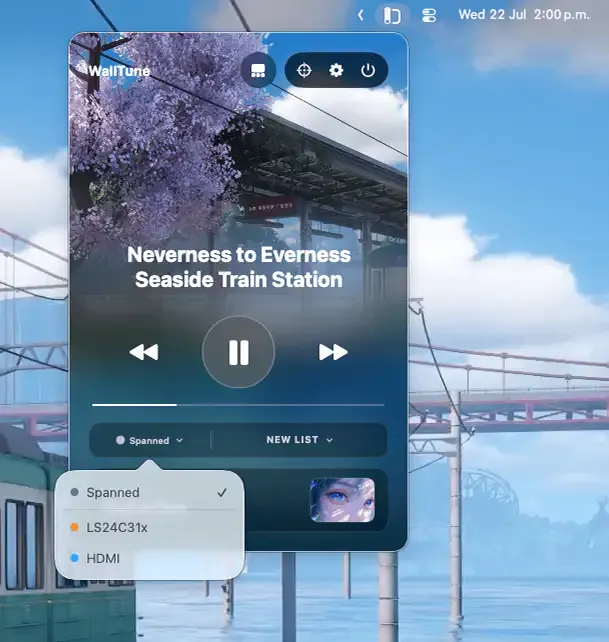
 1 screenshot
At a Glance
Best For
Running separate image and video wallpaper playlists on each display.
The Catch
The $5.99 App Store edition lacks Lock Screen wallpapers and part of the gallery.
About WallTune
WallTune is a multi-monitor wallpaper manager that runs from the Mac menu bar, enabling independent image and video wallpapers per display with profile switching and Focus Mode automation. ($5.99 App Store / $10 direct, one-time)
Each connected monitor can receive a unique wallpaper assignment — a different image folder, video file, or playlist — independent of other displays. WallTune uses hardware fingerprinting to identify each display persistently, so assignments survive monitor disconnection and reconnection without requiring reconfiguration. A span mode extends a single panoramic image or video across all displays simultaneously with alignment controls.
Named profiles capture entire multi-monitor desk configurations, allowing users to switch between layouts — work, creative, relaxation — in a single click. Focus Mode integration connects wallpaper playlists to macOS Focus modes, automatically changing the desktop environment when switching from a Work focus to a Personal one. This integration requires no manual switching once configured.
Smart playback pauses video wallpapers automatically during fullscreen applications, periods of high CPU load, or when on battery power, reducing resource consumption during intensive tasks. Supported video formats include MP4, MOV, and M4V; image playlists support JPEG, PNG, HEIC, and TIFF.
System requirements: macOS 14 or later for wallpaper features; macOS 26 or later for lockscreen video support. Universal binary (Apple Silicon and Intel). 7-day free trial available.
Pricing: ($5.99, App Store, one-time; $10 direct, one-time, up to 3 Macs)
Limitations: Direct purchase version is limited to 3 personal devices. App Store version does not support lockscreen video playback. Lockscreen video requires macOS 26, which limits compatibility to very recent systems. Video wallpapers consume more battery than static images even with smart playback active.
Alternatives: HiDock (display management focused, no video wallpapers); Irvue (auto-refreshing Unsplash wallpapers, single-monitor); macOS built-in wallpaper settings (no video, no per-monitor independent control).
Suitable for users with multi-monitor setups who want dynamic, context-aware desktop environments without manually switching wallpapers between work modes.
FAQ
What does WallTune do?+
WallTune manages wallpapers and video backgrounds across multiple monitors independently. Each display can run a different image or video, and named profiles switch the entire desk setup in one click. Focus Mode integration auto-switches wallpaper playlists based on active macOS Focus modes.
Is WallTune free?+
No. WallTune offers a 7-day free trial with full access. The App Store version costs $5.99 (one-time, Family Sharing enabled). The direct purchase version costs $10 (one-time, up to 3 Macs), with a 14-day money-back guarantee.
How do I install WallTune on macOS?+
WallTune is available at https://walltune.app/ as a direct download ($10) or from the Mac App Store ($5.99). It requires macOS 14 or later for wallpaper features; lockscreen video requires macOS 26 or later.
Does WallTune run on Apple Silicon?+
Yes. WallTune is a universal binary that runs natively on Apple Silicon and Intel Macs.
What video formats does WallTune support?+
WallTune supports MP4, MOV, and M4V video formats, plus image folders containing JPEG, PNG, HEIC, and TIFF files. Images can be organized as playlists that cycle on a timer.
How does WallTune handle multiple monitors?+
WallTune uses hardware fingerprinting to persistently identify each connected display, so per-monitor assignments survive disconnection and reconnection. Named profiles let users switch an entire multi-monitor desk configuration in a single action.