
TimeMachineEjector
Free, open-source menu bar app that ejects your Time Machine backup disk when a backup finishes and remounts it when the next scheduled backup is due.
- Price
- Free
- Requires
- macOS 13 or later
- Runs on
- Not Listed
- Size
- Not Listed
- Around Since
- Not Listed
- Open Source
- Yes
- Last Checked
- 2026-11-09
Free, open-source (MIT license).
License: MIT
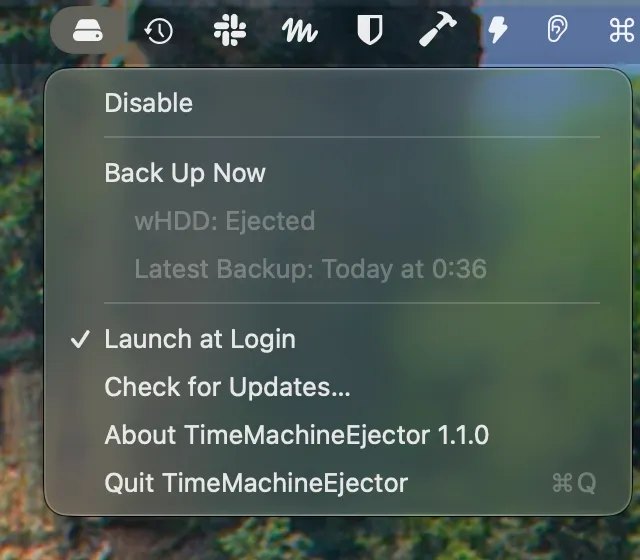
 1 screenshot
At a Glance
Best For
Unplugging an external Time Machine disk without ejecting it by hand.
The Catch
The disk is unmounted after each backup, so it is not available in Finder until the next backup or a Back Up Now. Other volumes on the same disk are unmounted too.
About TimeMachineEjector
TimeMachineEjector watches Time Machine from the menu bar and ejects the backup disk once the backup and its cleanup are done. You no longer get the “Disk Not Ejected Properly” notification after unplugging an external drive you forgot to eject.
The menu shows whether the disk is connected, ejected or backing up, with progress and the time of the latest backup. The disk icon gets a Time Machine badge while a backup runs. Back Up Now mounts the ejected disk and starts a backup. You can disable the app from the menu when you want to keep the disk mounted.
It works with the backup disk you already use in Time Machine, so there is nothing to configure beyond turning on Launch at Login. Install a release from GitHub or use brew install --cask wata/tap/timemachineejector. Version 1.1.0 is the latest GitHub release.
Sources checked on November 9, 2026: GitHub README and latest release. This is a review of publisher documentation, not a hands-on test.
Consider These Alternatives
Different approaches to a similar job. Read each review before choosing.
FAQ
When can I unplug the backup disk?+
Any time the menu shows Ejected. While the menu bar icon has a Time Machine badge, a backup is running, so wait until the menu shows Ejected.
Do scheduled backups still run?+
Yes. Time Machine does not mount an ejected disk by itself, so TimeMachineEjector mounts it when a backup is due, following the frequency in Time Machine settings. Nothing happens if automatic backups are off.
Does it power off the disk?+
No. The disk is unmounted, not powered off, so it can be mounted again for the next backup. Other volumes on the same disk are unmounted too, as with ejecting in Finder.
How do I install TimeMachineEjector?+
Download the signed and notarized build from GitHub releases, or run `brew install --cask wata/tap/timemachineejector`. It checks for updates automatically.