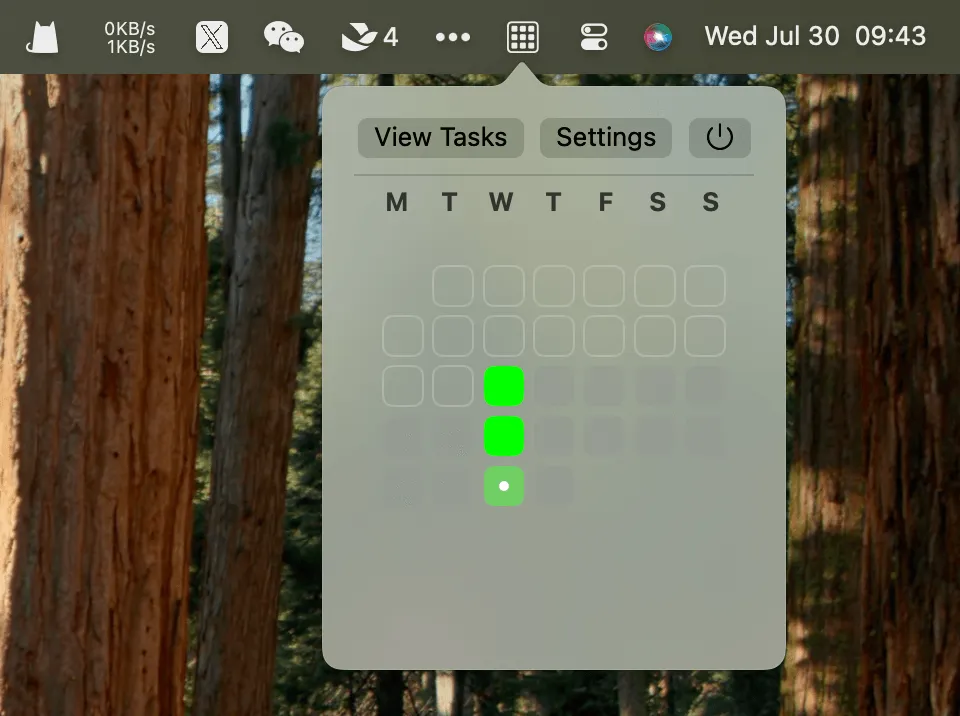
Tasktile displays a GitHub-style contribution calendar in the Mac menu bar, providing visual feedback for daily task completion. Each tile in the grid represents a day of the month, with completed task days highlighted in green.
The interface maintains deliberate simplicity: clicking the menu bar icon reveals a calendar grid showing the current month with days of the week labeled. Two buttons provide access to “View Tasks” and “Settings”. The visual approach transforms task tracking into an immediately scannable progress indicator rather than lists or statistics.
Key features include:
- Menu bar activity graph mirroring GitHub’s contribution calendar aesthetic
- Daily task completion tracking with visual tile highlights
- Minimal interface without project hierarchies, tags, or collaboration features
- Lightweight resource usage with no noticeable performance impact
The app requires macOS 14.0 or newer and is built with modern Swift. Tasktile is free and open-source under the MIT license, developed by jasonqiu0 who welcomes community contributions.
Installation requires an additional step since the developer has not enrolled in Apple’s Developer Program. After downloading the DMG from GitHub releases and moving to Applications, users must navigate to System Settings, Privacy & Security, and click “Open Anyway” to authorize the app.
Limitations include the lack of comprehensive task management features. Tasktile tracks only whether daily tasks were completed, without support for detailed task organization, due dates, or reminders. Users needing full task management should pair Tasktile with a dedicated task manager.
Alternatives include Streaks for habit tracking with more features, or GitHub’s own contribution graph for developers already tracking commits.
Suitable for users who find motivation in visual progress tracking and appreciate the aesthetic of activity graphs, particularly those wanting simple consistency tracking without complex task management overhead.


