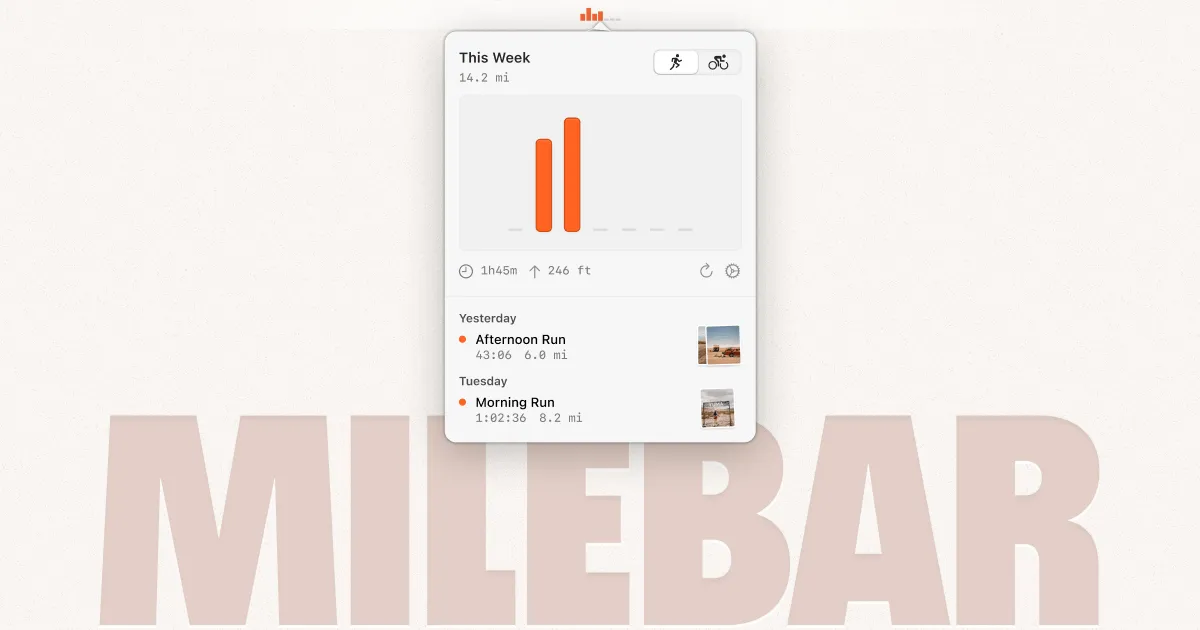
Milebar displays Strava training data directly in the macOS menu bar, providing quick access to weekly metrics without opening the full Strava application. The app shows accumulated time and elevation gain at a glance.
The menu bar interface presents a compact summary of current training volume, with dropdown access to individual activity listings. Each activity displays distance, duration, elevation change, and activity type (run, ride, etc.). Users can refresh data on demand to pull the latest activities from Strava.
The app integrates with Strava’s API to retrieve user activity data. Authentication occurs through Strava’s standard OAuth flow. Once connected, the menu bar displays real-time training statistics based on the current week’s logged activities.
The interface follows macOS design patterns with native menu bar styling. Settings are accessible through the menu dropdown. The app runs as a lightweight background process with minimal system resource usage.
System requirements: macOS 14 (Sonoma) or newer. Requires an active Strava account with logged activities.
Limitations: macOS-only with no iOS or iPadOS versions. The app is dependent on Strava connectivity and does not function offline. No support for other fitness platforms (Garmin Connect, TrainingPeaks, etc.). Display is limited to weekly aggregates rather than monthly or custom date ranges.
Alternatives: Strava’s desktop website, Strava mobile app, TrainingPeaks desktop app.
Suitable for runners and cyclists who track workouts on Strava and want convenient access to training volume statistics without launching a browser or full application.