
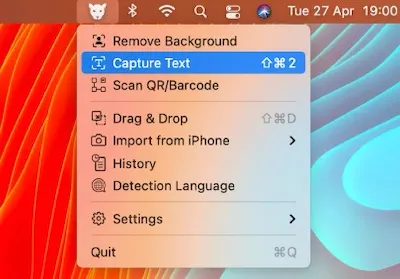
LensOCR provides optical character recognition (OCR) capabilities from the menu bar, enabling text extraction from any screen content including images, videos, locked PDFs, and presentations.
The app activates via keyboard shortcut. Users draw a selection around target text, and LensOCR recognizes and copies the content to the clipboard. The OCR engine processes printed documents, handwritten notes, and text displayed in video calls or screen shares. This addresses the common workflow gap of encountering non-selectable text that requires manual retyping.
Beyond basic text capture, additional features include QR code and barcode scanning directly from screen content, eliminating the need to use a phone for codes displayed on the Mac. A drag-and-drop mode extracts text from multiple non-contiguous image areas and combines them, useful for complex layouts or reconstructing paragraphs from scattered sections.
Integration with Apple’s Continuity Camera allows users to scan physical documents using an iPhone directly into the Mac, bridging physical and digital document workflows within the Apple ecosystem.
The app operates with minimal system impact. Requirements include macOS 10.15 Catalina or newer. LensOCR is available on the Mac App Store for $4.99 (one-time purchase) with no subscription required.
Limitations include the absence of cloud sync or captured text history. Content exists only in the clipboard until pasted elsewhere. The app adds one icon to the menu bar, which may concern users with already crowded menu bar spaces. For simple text extraction workflows, this minimal feature set serves as an advantage rather than a constraint.
Suitable for users who regularly encounter non-selectable text in images, videos, presentations, or locked documents and need quick clipboard-based extraction.
