
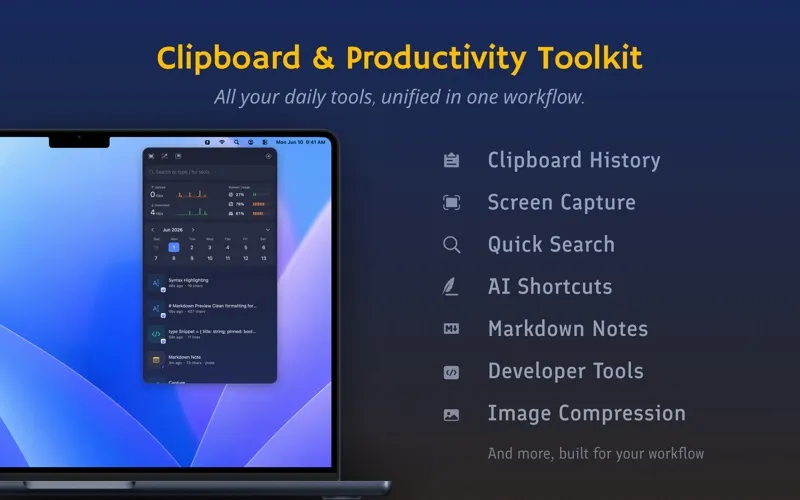
Frset is a menu bar productivity toolkit for macOS that combines clipboard management, screenshot tools, OCR, developer utilities, and notes in a single app. (Freemium; Pro $9.99 one-time)
The clipboard panel organizes copied items by type — text, links, images, and files — with instant search across history. The free plan retains 24 hours of clipboard entries; Pro removes the time limit entirely. Items can be tagged and organized into collections for persistent retrieval. Sensitive data such as passwords and API tokens is flagged automatically to reduce accidental exposure.
The screenshot module captures, annotates, and pins images to the screen with markup tools. Screen translation and OCR text extraction convert image content to selectable text without leaving the current window. QR code recognition scans codes from screenshots or live capture. A batch image compression tool reduces file sizes directly from the screenshot panel. The screenshot workflow operates within a single interface, reducing the need to switch between separate capture and annotation apps.
Developer tools include a JSON formatter, timestamp converter, variable name generator, Base64 encoder, and URL encoder — accessible from the menu bar without switching to a terminal or browser tab. AI shortcuts connect to external language models for text transformation tasks via a user-supplied API key. A lightweight Markdown notes panel with optional iCloud sync (Pro) provides a scratch pad accessible alongside other tools. A system monitor widget displays CPU, memory, and disk status inline.
System requirements: macOS 12.0 Monterey or newer. Universal app (Apple Silicon and Intel). Under 7 MB.
Pricing: (Freemium — free tier permanently available with limitations; Pro is $9.99 one-time, launch price)
Limitations: The free plan restricts clipboard tags to 3, notes to 10, and developer tool uses to 3 per day. AI shortcuts require a separate API key and internet access. The all-in-one approach means users needing only a clipboard manager carry unused functionality.
Alternatives: Maccy is a free, open-source clipboard manager focused exclusively on clipboard history. Pasty ($3.99) provides clipboard management with iCloud sync and tagging. CopyClip 2 offers a straightforward clipboard history viewer on the Mac App Store.
Suitable for users who want a single menu bar app covering clipboard history, screenshot annotation, and developer utility needs without managing multiple separate tools.


