
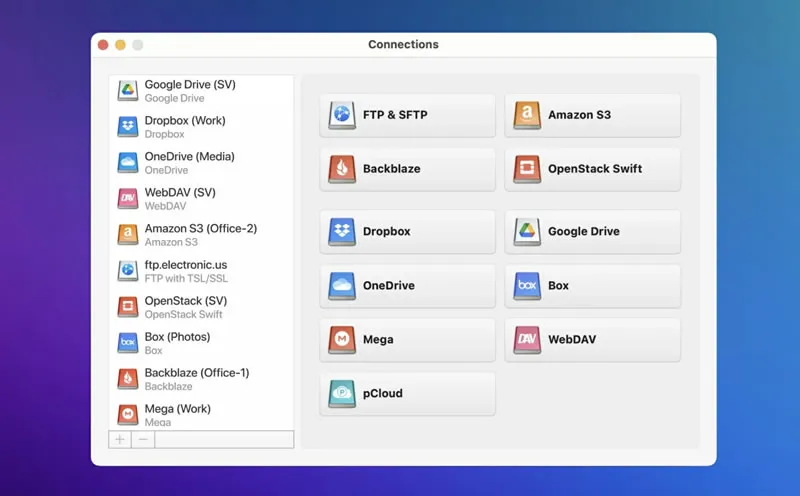
CloudMounter mounts cloud storage services and remote servers as local drives in Finder, providing unified access to files without consuming local storage. The app supports Google Drive, Dropbox, OneDrive, Amazon S3, Backblaze B2, pCloud, Box, and remote protocols including FTP, SFTP, and WebDAV.
Files stream on-demand rather than syncing locally. Users see complete folder structures but data downloads only when files are opened, preserving disk space. Optional local caching improves performance for frequently accessed files.
A key feature is cross-service file transfers through Finder drag-and-drop. Moving files between cloud providers occurs server-to-server without intermediate local downloads, saving time and bandwidth. The app includes AES-256 encryption for cloud-stored files, with keys secured in macOS Keychain.
Connection setup uses OAuth for consumer cloud services and credential entry for FTP/SFTP servers. SFTP connections support hardware authentication keys (YubiKey) and two-factor authentication. The menu bar icon provides one-click mounting and unmounting of connected drives.
Resource usage is minimal at approximately 60-80MB memory with negligible CPU activity during idle periods.
System requirements: macOS 10.15.4 Catalina or later. Available for Mac and Windows.
Pricing: $29.99/year for personal license, or included with Setapp subscription. 7-day free trial available.
Limitations: Requires active internet connection for file access. No automatic background synchronization like native cloud clients. Advanced SFTP features (file permissions) unavailable through Finder interface.
Alternatives: Mountain Duck offers similar functionality with broader protocol support. Native sync clients (Dropbox, Google Drive, OneDrive apps) provide offline access but consume local storage.
Suitable for users who manage multiple cloud storage accounts or need to access remote servers through Finder without maintaining local copies of all files.


